
Quick answer: The best IPTV apps for Firestick in Canada in late 2026 are TiviMate (the strongest TV guide and catch-up experience, with a paid premium tier), IPTV Smarters Pro (free, simple, works with the Xtream Codes logins most Canadian providers send) and IBO Player (fast, MAC-based, popular with families who want zero setup on the TV itself). All three install in about five minutes with the free Downloader app, but only on a Fire TV Stick that still runs the Android-based Fire OS. The newer Fire TV Stick 4K Select, the 2026 Fire TV Stick HD and the 2026 Fire TV Stick 4K run Amazon’s Vega OS, which does not let you sideload IPTV players at all.
IPTV (Internet Protocol Television) simply means live channels and on-demand video delivered over your internet connection instead of by cable or satellite. In Canada that usually means a subscription from an IPTV provider who sends you an M3U playlist link (a plain-text file listing channel streams) or an Xtream Codes login (a server address, username and password), plus an EPG (electronic programme guide) link. The Fire TV Stick is the device most Canadians plug into the back of a TV for this, because it is cheap, sold everywhere from Amazon.ca to Best Buy and Walmart, and runs Android-based software that accepts apps from outside the Amazon Appstore.
This guide ranks the IPTV players that matter for a Canadian household, gives prices in Canadian dollars where they can be confirmed, walks through the Downloader installation, and flags what most buying guides miss: the Fire TV model you buy now decides whether you can install any of these apps at all. Our broader IPTV on Firestick guide for Canada covers the subscription side; this page is about the apps.
How did we evaluate the best IPTV apps for Firestick?
We judged each app on the things that actually change a Canadian evening in front of the TV, not on feature-list length. A player that cannot show “Hockey Night in Canada, 7:00 p.m. ET” correctly in Calgary (where it starts at 5:00 p.m.) is a worse player, whatever else it does.
- EPG quality: does the guide load the full XMLTV data your provider sends, show a proper grid, and let you shift times for Canada’s six time zones?
- Catch-up and recording: can you replay a Leafs game that ended two hours ago, or record a show to the stick while you watch something else?
- Multi-screen: can you put two NHL games or the Jays and a CFL match on one screen?
- 4K and codec support: does the app hand H.265/HEVC streams to the Fire TV’s hardware decoder, or fall back to software decoding that stutters?
- Stability on 1 GB sticks: the Fire TV Stick HD and Lite have half the memory of the 4K models, and some apps crash or reload constantly on them.
- French interface: a real consideration for Québec, New Brunswick and francophone households in Ontario and Manitoba.
- Cost in CAD and how you pay: free, one-off licence or recurring, and whether you need a phone, a Google account or a MAC-address activation site.
One clarification: an IPTV player is only a player and does not come with channels. Google Play’s listing for TiviMate states that premium upgrades “unlock app features only” and “don’t include any channels or content” (TiviMate on Google Play). The channels come from your subscription, which is why the provider’s quality matters as much as the app’s. For players across all devices, see our best IPTV player comparison for Canada.
Is TiviMate the best IPTV app for Firestick in Canada?
In our view, yes, if you will pay a small premium fee and spend ten minutes configuring it. TiviMate, published by Armobsoft FZE, is built for Android TV and Fire TV remotes; Google Play describes it as “designed for Android TV and remote control navigation” and the listing was updated on 22 June 2026, so it is actively maintained. Its guide is the closest thing to a Bell Fibe or Rogers Ignite grid from a third-party app.
TiviMate features that matter for Canadian viewers
The free version supports one playlist, the grid EPG, favourites and basic playback. Premium adds the features Canadians ask about most: catch-up (replaying past broadcasts on channels where the provider supports it), recording to local storage, multiview (several channels on one screen, ideal for a Saturday with three Canadian teams playing), multiple playlists, parental controls and automatic playlist updates. An EPG time-shift setting lets you correct guides that arrive in Eastern time when you are in Vancouver, Edmonton or St. John’s.
TiviMate works with both M3U links and Xtream Codes logins, and it can group channels by the categories your provider defines (for example “CA | Sports”, “CA | Québec”, “CA | News”). It also supports external players, so a stream that misbehaves in the built-in player can be handed to VLC. The interface can be switched to French under Settings, which makes it a reasonable choice for Québec households.
TiviMate price in Canada and how you pay
Because the Fire TV has no Google Play Store, you buy premium through the separate TiviMate Companion app on an Android phone, which, in the developer’s words, exists to “unlock Premium functionality of TiviMate IPTV player on devices without Google Play” and to manage activated devices (TiviMate Companion on Google Play).
The listing itself shows no public price, only an “in-app purchases” label, and user reviews in 2026 mention a yearly fee of roughly US$10 and a lifetime option of roughly US$20. Treat those as estimates: the exact CAD amount is shown inside the Companion app at checkout and depends on the exchange rate on the day. No iPhone-only households take note: you need an Android phone or tablet (or a friend’s) to make the purchase.
Pros: best guide and catch-up on Fire TV, multiview, recording, French UI, actively updated. Cons: premium needed for the headline features, purchase requires an Android phone, heavier on memory than Smarters on the 1 GB sticks, and the many settings menus intimidate some first-time users. Our full TiviMate setup walkthrough covers the playlist, EPG and time-zone screens one by one.
What does IPTV Smarters Pro do well on a Fire TV Stick?
IPTV Smarters Pro is the app most Canadian providers put in their welcome email, because it is free, asks for exactly three things (server URL, username, password) and works on almost everything. On Fire TV it is sideloaded as an APK; the version in the Amazon Appstore has come and gone over the years, so most people install it through Downloader. It handles live TV, movies and series in separate tabs, supports both Xtream Codes API and M3U playlists, and reads the provider’s EPG with a basic programme bar rather than a full grid.
Smarters’ multi-screen mode shows up to four streams at once, which works on a Fire TV Stick 4K Max but stutters on the HD stick. Parental control, favourites, catch-up on supported channels and external-player support are included, and the interface is available in French. The weaknesses are a dated look, a weaker guide than TiviMate, and “add user” and playlist prompts that confuse some first-time users.
Pros: free, provider-friendly, light enough for older sticks, French UI, series and movie tabs. Cons: no real EPG grid, multi-screen is demanding, occasional login bugs after updates. If Smarters is what your provider recommends, our IPTV Smarters Pro guide for Canada explains the login screen field by field.
Which other IPTV players for Firestick are worth installing?
IBO Player
IBO Player takes a different approach: instead of typing a login on the TV, you register the stick’s MAC address and device key on the developer’s website and attach your playlist there; the app then loads everything automatically. It is quick, clean, and popular with Canadians setting up a stick for parents or grandparents who should never see a settings menu. The trade-off is a paid activation after a trial period, priced in US dollars or euros on the activation site; check the current figure before relying on it. Our IBO Player activation guide shows the MAC-address step with screenshots.
XCIPTV
XCIPTV is a free Xtream Codes player with a choice of engines, including ExoPlayer and VLC, inside the same app, which makes it a useful troubleshooting tool: if a Sportsnet feed buffers in one engine, switch to the other. It has catch-up, a guide and simple multi-screen, but it is heavier than Smarters, so keep it for 4K-class sticks.
IPTV Smarters Lite
Smarters Lite is the stripped-down sibling of Smarters Pro, aimed at the official app stores and at low-memory devices. It drops some of the extras but keeps Xtream and M3U login and the basic guide. On a Fire TV Stick Lite or HD with 1 GB of RAM it is one of the most stable options we have run, which is the only reason to choose it over the full app.
Televizo
Televizo is a lightweight player with a clean guide, M3U and Xtream support, and a genuinely usable free tier; premium is a small one-off unlock. It lacks recording and multiview, but it starts fast and remembers where you were, which matters when the family is flipping between CBC, TVA and a game.
OTT Navigator
OTT Navigator is the power user’s alternative to TiviMate: a highly customisable guide, catch-up, multiple playlists, picture-in-picture and detailed stream statistics, with a premium tier for the advanced features. The menus are dense, so we recommend it only if you enjoy tweaking settings, and only on 2 GB sticks.
Sparkle TV
Sparkle TV is one of the few IPTV players that has been available directly in the Amazon Appstore for Fire TV, so there is no Downloader step and no “unknown sources” toggle. It supports M3U and Xtream with an EPG and favourites. Appstore availability changes, so search for it on the stick first.
CR Player (included with IPTV Canada)
IPTV Canada includes its own free CR Player with every plan, pre-configured for the service’s EPG and catch-up so there is nothing to type beyond your login. It does not replace TiviMate’s advanced features, but it is the fastest route from “stick plugged in” to “watching” if you subscribe with us.
How do the best IPTV apps for Firestick compare side by side?
| App | Cost (approx., CAD) | EPG grid | Catch-up | Multi-screen | Recording | French UI | Best on |
|---|---|---|---|---|---|---|---|
| TiviMate | Free; premium ~C$14/yr or ~C$28 lifetime (est.) | Excellent | Yes (premium) | Yes (premium) | Yes (premium) | Yes | 4K, 4K Max, 4K Plus, Cube |
| IPTV Smarters Pro | Free | Basic bar | Yes | Up to 4 | Limited | Yes | All Fire OS sticks |
| IBO Player | One-off activation (US$/€, varies) | Good | Yes | No | No | Yes | All Fire OS sticks |
| XCIPTV | Free | Good | Yes | Yes | No | Yes | 4K-class sticks |
| Smarters Lite | Free | Basic | Yes | No | No | Yes | HD, Lite (1 GB) |
| Televizo | Free; small premium unlock | Good | Yes | No | No | Yes | All Fire OS sticks |
| OTT Navigator | Free; premium tier | Excellent | Yes | PiP | Yes (premium) | Yes | 4K-class sticks |
| Sparkle TV | Free (Appstore) | Good | Varies | No | No | Partial | Any, incl. no-sideload setups |
Our recommendation for most Canadian households: install Smarters Pro first because it is free and nearly guaranteed to work with your provider’s login, then try TiviMate’s free tier for a week and buy premium if you want catch-up, recording or a real guide. Keep IBO Player in mind for a second TV used by someone less technical.
How do you install an IPTV app on a Firestick with Downloader?
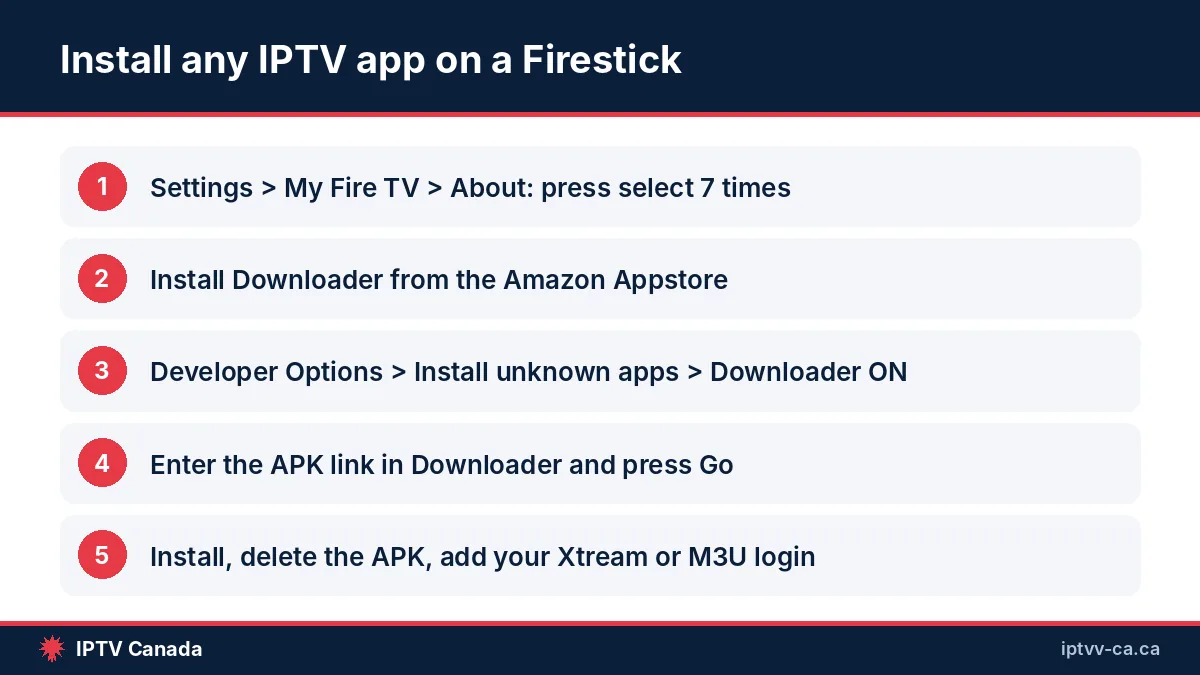
Downloader is a free utility written by Elias Saba of AFTVnews. It has a built-in browser and file manager, saves files to a folder on the stick (by default /sdcard/Downloader) and, when you select an APK (Android application package) there, hands it to the Fire TV installer (Downloader documentation). Before any sideloaded app will install, the Fire TV must accept apps from unknown sources. Amazon’s developer documentation gives the path: Settings, My Fire TV (or Device), Developer Options, then Apps from Unknown Sources (Amazon Fire TV developer docs). On recent software the Developer Options menu is hidden until you reveal it.
- Reveal Developer Options. Go to Settings, My Fire TV, About, highlight your Fire TV Stick’s name and press the select button on the remote seven times. Amazon’s documentation confirms this seven-press method applies on current software versions. A message tells you that you are now a developer.
- Install Downloader. From the home screen, search the Appstore for “Downloader” (the orange icon with a white arrow) and install it. It is free.
- Allow Downloader to install apps. Back in Settings, My Fire TV, Developer Options, open Install unknown apps (on Fire OS 7 and 8) and turn Downloader on. Older Fire OS 5 and 6 sticks show a single global Apps from Unknown Sources switch instead.
- Enter the APK address. Open Downloader, select the URL field and type the direct download link your IPTV provider gave you, or the developer’s official APK link. Downloader also accepts short codes that resolve to the same file. Press Go.
- Install and clean up. When the download finishes the Fire TV installer opens; choose Install, then Done. Go back to Downloader and choose Delete when prompted so the APK does not waste the stick’s limited storage, which is 8 GB on most models.
- Add your playlist. Open the new app from Your Apps & Channels, pick Xtream Codes or M3U, and enter the details from your provider’s email. Allow a minute for a large playlist and EPG to load.
If the installer closes immediately, the usual cause is that you enabled unknown sources globally but not for Downloader itself. If Downloader does not appear in Appstore search, use the Amazon website on a computer and choose “deliver to” your Fire TV. Screenshots for every Fire TV generation are in our IPTV setup guide for Canada.
Setting up on a Smart TV or an Android box instead? The steps for each device are in this walkthrough: How to Set Up IPTV in Canada on Fire Stick, Smart TV and Android.
Which Fire TV model should a Canadian buy for IPTV apps in 2026?
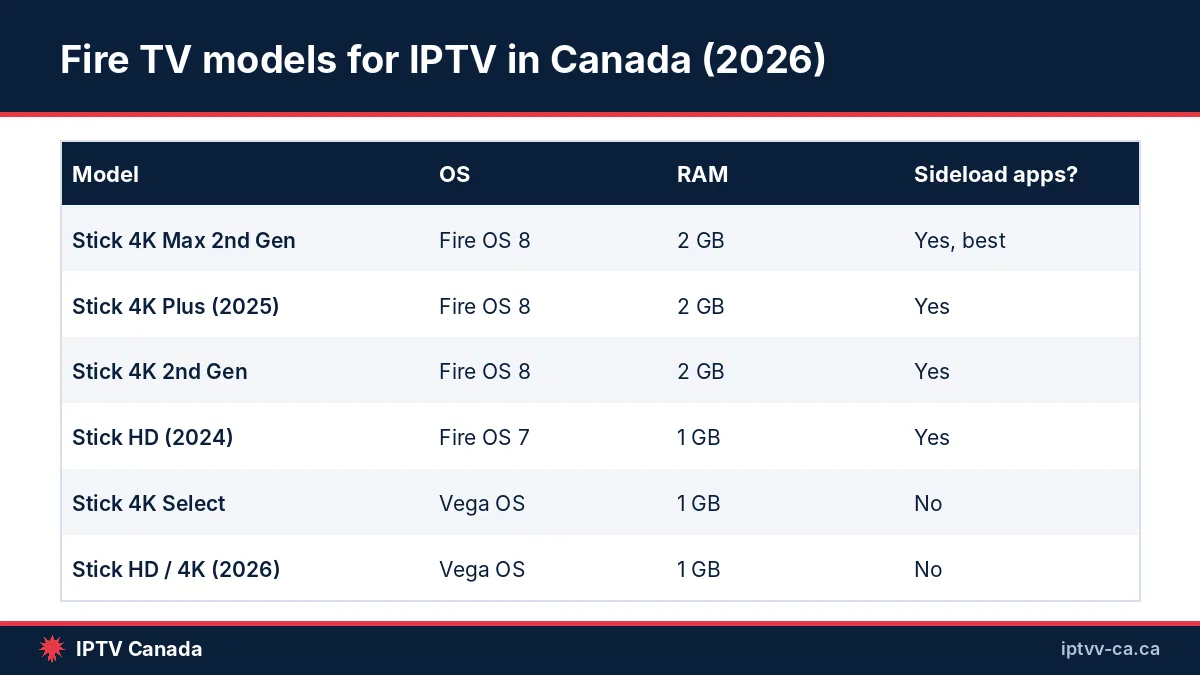
This is the most important section on the page. In October 2025 Amazon launched the Fire TV Stick 4K Select, the first Fire TV that does not run Fire OS. It runs Vega OS, Amazon’s own Linux-based system, and Amazon’s announcement stated that “only apps from the Amazon Appstore are available for download” (AFTVnews coverage of the 4K Select and Vega OS).
AFTVnews later reported that Amazon’s developer page was updated to say that, starting with the 4K Select, all future Fire TV Sticks will run on Vega (AFTVnews, April 2026). Amazon’s 2026 device specifications now list a Fire TV Stick HD (2026) on Vega OS 1.1 and a Fire TV Stick 4K 3rd Gen (2026) on Vega OS 2.0 (Amazon Fire TV device specifications).
In plain terms: a Vega OS stick cannot run TiviMate, Smarters Pro, IBO Player, XCIPTV or any other sideloaded Android APK, and the Downloader method does not apply to it. For IPTV you want a stick that still runs Fire OS 7 or 8. As of October 2026 those are still sold new on Amazon.ca and in Canadian stores, but check the model name carefully before buying.
| Model (year) | Operating system | RAM / storage | Wi-Fi | Max output | Sideload IPTV apps? | Our verdict for IPTV |
|---|---|---|---|---|---|---|
| Fire TV Stick Lite (2020) | Fire OS 7 | 1 GB / 8 GB | Wi-Fi 5 | 1080p | Yes | Budget only; Smarters Lite |
| Fire TV Stick HD (2024) | Fire OS 7 | 1 GB / 8 GB | Wi-Fi 5, 2×2 MIMO | 1080p | Yes | Fine for one HD stream |
| Fire TV Stick 4K 2nd Gen (2023) | Fire OS 8 | 2 GB / 8 GB | Wi-Fi 6 | 4K HDR | Yes | Best value for IPTV |
| Fire TV Stick 4K Max 2nd Gen (2023) | Fire OS 8 | 2 GB / 16 GB | Wi-Fi 6E | 4K HDR | Yes | Best overall for IPTV |
| Fire TV Stick 4K Plus (2025) | Fire OS 8 | 2 GB / 8 GB | Wi-Fi 6 | 4K, Dolby Vision | Yes | Newest safe choice |
| Fire TV Cube 3rd Gen (2022) | Fire OS 7 | 2 GB / 16 GB | Wi-Fi 6E + Ethernet | 4K HDR | Yes | Best if you can run a cable |
| Fire TV Stick 4K Select (2025) | Vega OS 1.1 | 1 GB / 8 GB | Wi-Fi 6 | 4K HDR | No | Avoid for IPTV |
| Fire TV Stick HD (2026) | Vega OS 1.1 | 1 GB / 8 GB | Wi-Fi 6 | 1080p | No | Avoid for IPTV |
| Fire TV Stick 4K 3rd Gen (2026) | Vega OS 2.0 | 1 GB / 8 GB | Wi-Fi 6 | 4K HDR | No | Avoid for IPTV |
The 4K Max 2nd Gen uses a 2 GHz MediaTek processor and Wi-Fi 6E, which is why it stays smooth with TiviMate’s guide and a 4K stream running at once (CNX Software). The Fire TV Stick 4K Plus (2025) is the newest stick that still runs Fire OS 8, with 2 GB of RAM, Wi-Fi 6 and Dolby Vision per Amazon’s specifications, so it is the one to look for if the Max is sold out. Our C$1.99 IPTV trial is a cheap way to confirm that your existing stick handles the streams before you commit to a longer plan.
What if you already own a Vega OS stick?
Keep it for Netflix, Crave and Prime Video and buy a second, Fire OS-based stick (or an Android TV box) for IPTV; check the Vega Appstore for a native player such as Sparkle TV, accepting that AFTVnews found many popular media apps missing; or, if it is still within Amazon.ca’s return window, exchange it for a 4K Max or 4K Plus. Our view is that the second stick is the least frustrating path for most families.
Which settings stop IPTV buffering on a Firestick?
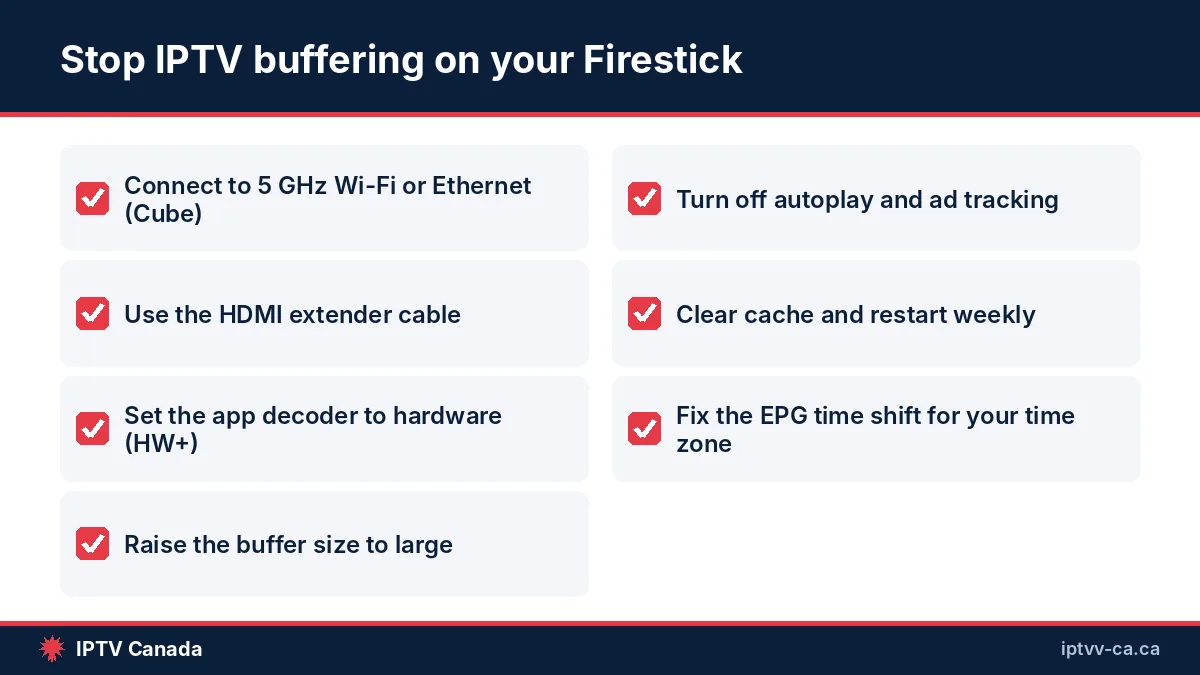
Buffering on a Fire TV Stick is usually one of four things: a weak 2.4 GHz Wi-Fi link, a stick out of memory, a decoder mismatch inside the app, or a provider server under load at puck drop. The checklist fixes the first three; the fourth is why provider peak-time capacity matters more than channel counts.
- Join the 5 GHz (or 6 GHz) network. Bell, Rogers and Telus gateways usually broadcast one combined name; in the gateway app, split the bands or set the stick to prefer 5 GHz. A Fire TV Cube on Ethernet removes Wi-Fi from the equation entirely.
- Use the HDMI extender. The short cable in the box moves the stick away from the metal back of the TV and typically improves signal strength noticeably.
- Set the player decoder to hardware (HW or HW+). In TiviMate: Settings, Playback, Decoder. In Smarters: Settings, Player Settings. Software decoding of H.265 on a 1 GB stick is the single most common cause of stutter.
- Raise the buffer size. TiviMate and XCIPTV let you choose small, medium or large; “large” costs a second of start-up delay and removes most micro-pauses.
- Turn off Fire TV’s background noise. In Settings, Preferences, disable Featured Content auto-play and app notifications; in Privacy Settings, disable interest-based ads and data monitoring. This frees memory on 1 GB sticks.
- Clear cache and uninstall what you do not use. Settings, Applications, Manage Installed Applications, choose the app, Clear cache. Delete leftover APKs in Downloader.
- Restart weekly. Settings, My Fire TV, Restart. Fire OS does not free memory well over long uptimes.
- Match the stream to the stick. Choose the 1080p feed of a channel on an HD stick and keep 4K feeds for the 4K Max, 4K Plus or Cube.
Canadian internet plans are rarely the bottleneck. A single 1080p IPTV stream uses roughly 5 to 8 Mbps and a 4K stream roughly 15 to 25 Mbps, well inside the plans most urban Canadians have from Bell, Rogers, Telus or regional providers such as Vidéotron, SaskTel, Eastlink or Cogeco. Rural fixed-wireless or satellite connections with high latency are the exception; there, a larger buffer and HD rather than 4K feeds make the biggest difference.
Fixing the EPG for your Canadian time zone
Most IPTV guides are generated in Eastern time or UTC. If a 7 p.m. Canucks game shows at 9 p.m. (10 p.m. from mid-March), set TiviMate’s playlist EPG time shift to minus two hours in winter or three in summer, because BC now stays at UTC−7; in Smarters, use the EPG offset. Exactly one hour off in BC, Alberta or Manitoba? The stick’s time-zone data predates their switch: update Fire OS or add one hour. Newfoundland users (UTC−3:30) should double-check half-hour rounding.
Is it legal and safe to sideload IPTV apps on a Firestick in Canada?
Sideloading itself is legal and is a documented feature of the device: Amazon’s developer FAQ states that Fire TV “is based on Android” and that apps can be installed outside the Appstore using the Android Debug Bridge, and Amazon publishes the Apps from Unknown Sources setting in its own documentation (Amazon Fire TV developer FAQ). TiviMate, Smarters and the other players on this page are general-purpose media players, in the same category as VLC or Kodi, and are distributed openly on Google Play or by their developers.
What the law cares about is the content you load into the player. IPTV as a technology is lawful; streaming channels from a source that does not hold the Canadian rights is not, and rights holders have used the courts to go after unauthorized services. In 2019 the Federal Court granted Canada’s first site-blocking order against the unlicensed GoldTV IPTV service at the request of Bell Media, Rogers Media and Groupe TVA, and the Federal Court of Appeal upheld it in 2021 in TekSavvy’s appeal (Smart & Biggar analysis of the GoldTV decisions).
The CRTC (Canadian Radio-television and Telecommunications Commission), by contrast, declined in Telecom Decision 2018-384 to create its own blocking regime, finding it lacked jurisdiction under the Telecommunications Act and that piracy belongs under the Copyright Act (CRTC Telecom Decision 2018-384). Those orders target services and the ISPs that must block them; we are not aware of any published Canadian case in which an individual viewer was prosecuted, and we do not claim otherwise.
Our recommendation is to treat the app and the subscription separately. Pick an app from this page, then choose a provider that is transparent about CAD pricing, offers a trial, answers support messages, and takes normal payment methods such as Visa, Mastercard, PayPal or Interac e-Transfer.
Avoiding fake and modified APKs
Because Fire TV apps are installed from a URL, the risk is not the app category but the file source. Look-alike “TiviMate” apps with similar names from unrelated developers appear on Google Play and APK mirrors. Download TiviMate only from the developer’s domain, Smarters from the publisher’s site, and IBO Player from its activation site. Avoid “cracked premium” builds: they typically bundle advertising frameworks or request permissions a TV player has no reason to need, such as contacts or SMS. On Fire OS, review a sideloaded app’s permissions under Settings, Applications, Manage Installed Applications, and uninstall anything that asks for more than storage and network access.
How much does IPTV on a Firestick cost in Canada in total?
Here is a worked example for an Ontario household setting up a living-room TV in autumn 2026. The stick is a one-time cost, the app is free or a small one-off, and the subscription is the recurring part. We use IPTV Canada’s published plans for the subscription line because those are the prices we can state exactly.
- Fire TV Stick 4K Max 2nd Gen: typically between roughly C$60 and C$90 at Canadian retailers depending on sales; the 4K 2nd Gen is usually C$15 to C$25 less.
- App: C$0 for Smarters Pro, or roughly C$14 per year or C$28 once for TiviMate premium (estimate converted from US dollars).
- Trial: IPTV Canada’s 24-hour trial is C$1.99 and runs on the same servers as paid plans.
- Subscription (1 device): C$20.99 for 1 month, C$41.99 for 3 months, C$55.99 for 6 months or C$90.99 for 12 months, each a one-off payment with no auto-renewal. A 4-device plan is C$66.99 for 1 month.
Over a full year, the stick plus TiviMate lifetime plus a 12-month single-device plan comes to roughly C$190 to C$210 in the first year and roughly C$91 a year after that, before tax. The IPTV Canada subscription plans for Canada page has the current multi-device prices and the payment options, including Interac e-Transfer with instructions sent by email or WhatsApp.
The short version: buy a Fire OS stick (4K Max or 4K Plus), install Downloader, sideload Smarters Pro and TiviMate, and run a C$1.99 trial to see the 34,000+ live channels and 195,000+ movies and series on your own screen before choosing a plan. Support is a real person on WhatsApp around the clock, with a 7-day money-back guarantee if you contact support within that week.
Frequently asked questions
What is the best IPTV app for Firestick in Canada?
For most Canadian households TiviMate is the best overall IPTV app for Firestick because of its full programme guide, catch-up, recording and multiview, with premium unlocked through the TiviMate Companion app on an Android phone. IPTV Smarters Pro is the best free option and works with the Xtream Codes logins most providers send. IBO Player suits a second TV for less technical family members. All three require a Fire TV Stick running Fire OS, not the newer Vega OS models.
Can I install IPTV apps on the new Fire TV Stick 4K Select?
No. The Fire TV Stick 4K Select launched in October 2025 runs Amazon’s Vega OS instead of the Android-based Fire OS, and Amazon says only Appstore apps can be downloaded on it. TiviMate, IPTV Smarters Pro, IBO Player and other APK-based players cannot be sideloaded, and the Downloader method does not apply. Amazon has said all future Fire TV Sticks will run Vega OS, so for IPTV choose a Fire OS 8 model such as the Fire TV Stick 4K Max 2nd Gen or 4K Plus.
How do I install TiviMate on a Firestick?
Enable Developer Options by pressing select seven times on your Fire TV’s name under Settings, My Fire TV, About. Install Downloader from the Amazon Appstore, then allow Downloader under Install unknown apps. Open Downloader, enter the official TiviMate APK link, and choose Install when the Fire TV installer opens. Open TiviMate, add your M3U or Xtream Codes playlist, and buy premium through the TiviMate Companion app on an Android phone if you want catch-up, recording or multiview.
Is IPTV Smarters Pro free on Firestick?
Yes. IPTV Smarters Pro is free to download and use on Fire TV; you only pay for the IPTV subscription whose login you enter into it. The app itself contains no channels. It is normally sideloaded with Downloader because its presence in the Amazon Appstore has been inconsistent. It supports Xtream Codes and M3U logins, catch-up, a basic guide, multi-screen on 4K-class sticks and a French interface, which makes it a common first app for Canadian viewers.
Why does my IPTV app keep buffering on my Firestick?
The usual causes are a weak 2.4 GHz Wi-Fi link, software decoding on a 1 GB stick, a small buffer setting, or a provider server under load at peak hockey hours. Connect to 5 GHz or use a Fire TV Cube on Ethernet, use the HDMI extender, set the app’s decoder to hardware, raise the buffer to large, clear app cache and restart the stick weekly. If only one provider buffers at 7 p.m. ET, the problem is their peak-time capacity, not your stick.
Is it legal to use IPTV apps on a Firestick in Canada?
Sideloading and using an IPTV player app is legal; Amazon documents the Apps from Unknown Sources setting itself, and players like TiviMate and Smarters are general media players sold on Google Play. Legality depends on whether the channels you stream are licensed for Canada. Courts have ordered Canadian ISPs to block unlicensed services such as GoldTV, upheld on appeal in 2021. Choose a transparent provider with CAD pricing and a trial, and avoid cracked or modified APKs.
Which Fire TV Stick is best for IPTV in Canada?
The Fire TV Stick 4K Max 2nd Gen (2023) is the best Fire OS stick for IPTV thanks to 2 GB of RAM, 16 GB of storage, Wi-Fi 6E and a 2 GHz processor, which keeps TiviMate’s guide and 4K streams smooth. The Fire TV Stick 4K Plus (2025) is the newest model that still runs Fire OS 8 and is the safe choice if the Max is sold out. The Fire TV Cube adds Ethernet. Avoid the 4K Select and the 2026 HD and 4K sticks, which run Vega OS and block sideloading.
Sources
- TiviMate IPTV Player — Google Play (Armobsoft FZE) (accessed October 2026)
- TiviMate Companion — Google Play (accessed October 2026)
- Connect to Fire TV Through ADB — Amazon Developer Documentation (accessed October 2026)
- Fire TV Frequently Asked Questions — Amazon Developer Documentation (accessed October 2026)
- Device Specifications: Fire TV Streaming Media Player — Amazon Developer Documentation (accessed October 2026)
- Comparison Table for Fire TV Devices — Amazon Developer Documentation (accessed October 2026)
- Downloader App: Documentation — AFTVnews (accessed October 2026)
- Fire TV Stick 4K Select and Vega OS coverage — AFTVnews (accessed October 2026)
- Amazon confirms all future Fire TV Sticks will run Vega OS — AFTVnews, April 2026 (accessed October 2026)
- Fire TV Stick 4K Max (2023) features a 2 GHz MediaTek MT8696T CPU, Wi-Fi 6E — CNX Software (accessed October 2026)
- Telecom Decision CRTC 2018-384 (FairPlay Canada application) — CRTC (accessed October 2026)
- Federal Court of Appeal upholds Canada’s first anti-piracy site-blocking order (GoldTV) — Smart & Biggar (accessed October 2026)
- News release 2026AG0013-000209 on B.C.’s move to permanent Pacific time (March 2, 2026) — BC Gov News (accessed October 2026)
Get the next IPTV guide by email
New setup guides, app comparisons and buffering fixes for Canadian viewers – about two emails a month, no spam, unsubscribe in one click.