
Quick answer: IPTV Smarters Pro is a free IPTV player app made by WHMCS Smarters. It does not include any channels: you log in with details from your IPTV provider, usually an Xtream Codes login (server URL, username and password) or an M3U link. In Canada it runs on Fire TV Stick, Android TV and Google TV boxes, Samsung smart TVs, phones and tablets. To set it up, install the app, choose Login with Xtream Codes API, enter your provider’s details exactly, and open Live TV to check the guide.
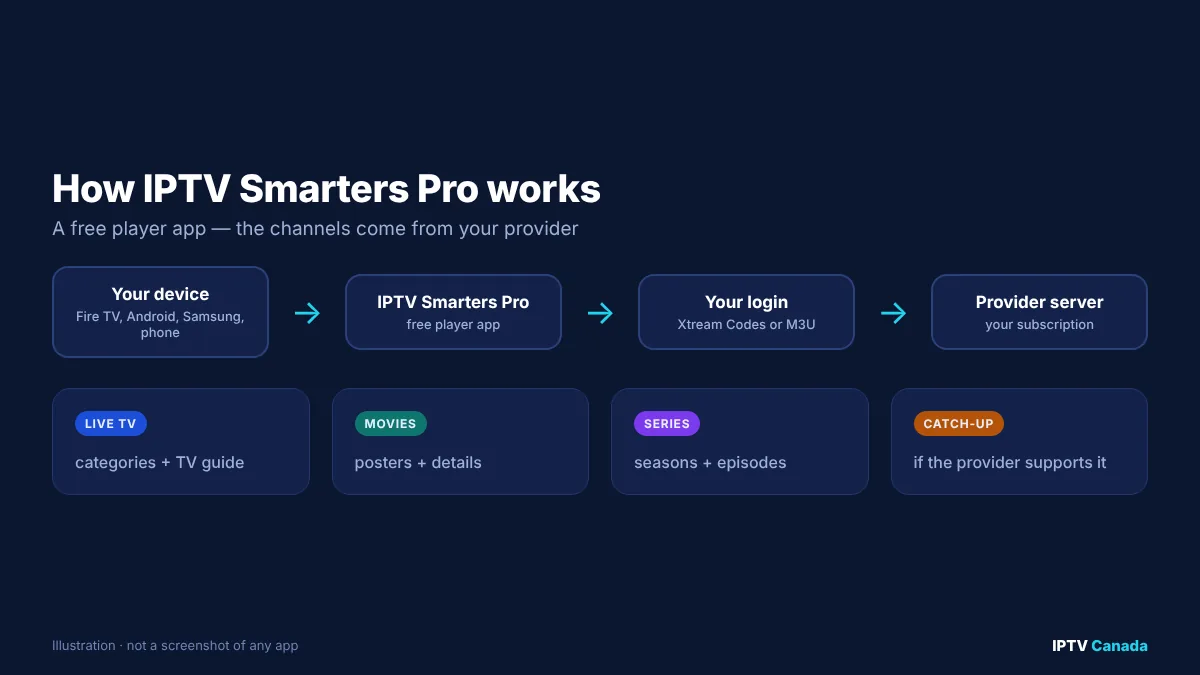
IPTV Smarters Pro is one of the most searched IPTV apps in Canada, and one of the most misunderstood. Many people install it expecting free TV, then find an empty login screen. Others see dozens of look-alike apps with similar names and are not sure which one is genuine.
This guide explains what IPTV Smarters Pro is, which devices it works on in Canada, how to install and log in step by step, the settings that make playback smoother, and how to fix the errors Canadians run into most often.
Table of Contents
What is IPTV Smarters Pro?
IPTV Smarters Pro is a media player application for IPTV services. It is developed by WHMCS Smarters, which is listed as the developer on the app’s Samsung TV app store page. The same listing describes support for live TV, video on demand, series, catch-up TV, an electronic programme guide (EPG), parental controls and multiple user profiles, and makes clear that users must bring their own content.
In practice, the app organises whatever your provider sends into four main sections:
- Live TV, with channel categories and a TV guide.
- Movies, with posters and descriptions.
- Series, organised by season and episode.
- Catch-up, where your provider supports it.
Because it is free and works on so many devices, many Canadian IPTV providers recommend it as the first app to try.
Is IPTV Smarters Pro free?
The app itself is free to download on most platforms. What you pay for is the IPTV subscription you log in to. Be cautious of websites that sell “IPTV Smarters subscriptions”: the app developer does not sell channels, so those are third-party services using the Smarters name.
IPTV Smarters Pro vs Smarters Player Lite
On Apple devices you will often find Smarters Player Lite or similarly named apps rather than “IPTV Smarters Pro”. They do the same job: play an IPTV subscription using Xtream Codes or M3U details. If you use an iPhone, iPad or Apple TV, search the App Store for “Smarters” and check the developer name before installing.
Which devices support IPTV Smarters Pro in Canada?
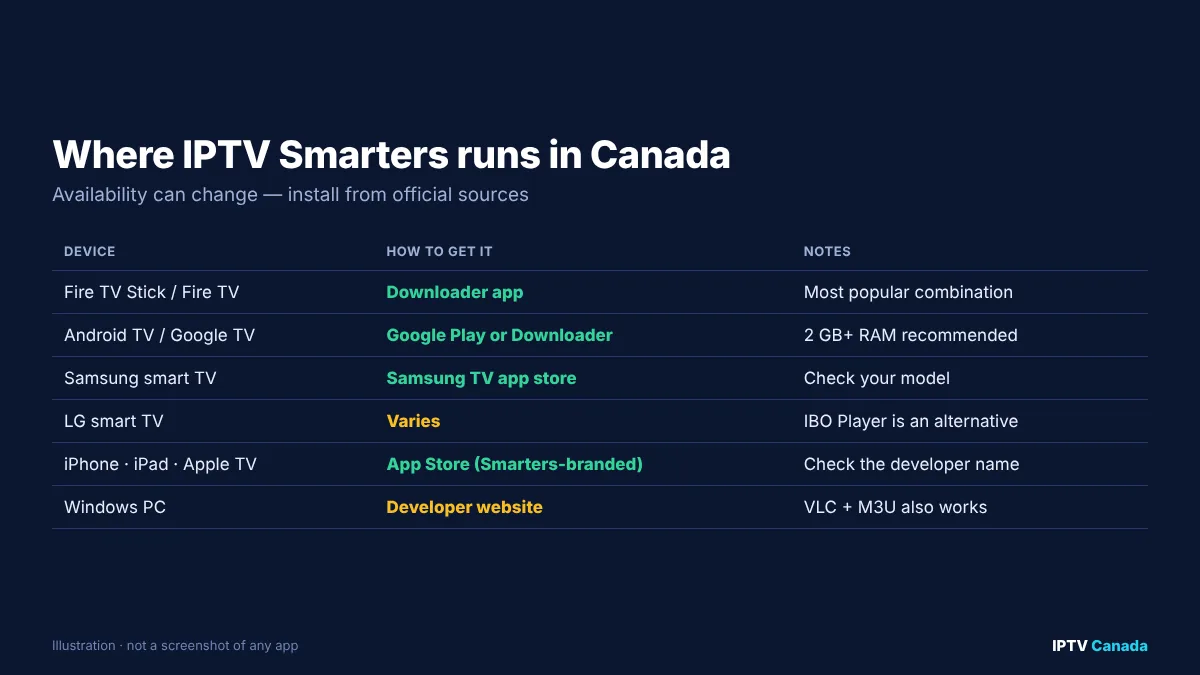
| Device | How to get it | Notes |
|---|---|---|
| Amazon Fire TV Stick / Fire TV | Usually installed via the Downloader app | Most popular combination in Canada |
| Android TV / Google TV boxes | Google Play Store or Downloader, depending on current availability | Works well on boxes with 2 GB+ RAM |
| Samsung smart TVs (Tizen) | Samsung TV app store, where available for your model | Check compatibility in the store |
| LG smart TVs (webOS) | Availability varies; alternatives include IBO Player | See our player guide |
| iPhone, iPad, Apple TV | App Store (Smarters-branded players) | Check the developer name |
| Android phones and tablets | Google Play Store or the developer’s site | Handy for testing on mobile data |
| Windows PC | Developer’s website | VLC with an M3U link is an alternative |
App store availability can change, and some versions are distributed only through the developer’s website. Install from official stores where you can, and avoid modified versions shared on forums.
How to install IPTV Smarters Pro on a Fire TV Stick
The Fire TV Stick is the most common way Canadians use the app.
- From the Fire TV home screen, go to Find > Search, type Downloader, and install the Downloader app from the Amazon Appstore.
- Go to Settings > My Fire TV > Developer options and allow Install unknown apps for Downloader. If you cannot see Developer options, open About, select your device name seven times, then go back.
- Open Downloader and enter the official download address for IPTV Smarters Pro published by the developer or your provider. Only use addresses you trust.
- Install the app when prompted, then delete the installation file to save space.
- Open the app, accept the terms, and continue to the login screen.
Our Firestick IPTV guide for Canada covers Fire TV settings and which Fire TV model is best for IPTV.
How to install IPTV Smarters Pro on Android TV, Samsung and Apple devices
- Android TV and Google TV: search the Google Play Store for “IPTV Smarters”. If it is not listed for your device, install Downloader from Google Play and use the developer’s official download address, as on a Fire TV Stick.
- Samsung smart TVs: press Home, open Apps, search for IPTV Smarters, and install it if it appears for your TV model.
- iPhone, iPad and Apple TV: search the App Store for a Smarters-branded player and confirm the developer before installing.
- Phones and tablets: installing on your phone first is a quick way to confirm your login works before you set up the TV.
How to log in to IPTV Smarters Pro (Xtream Codes or M3U)
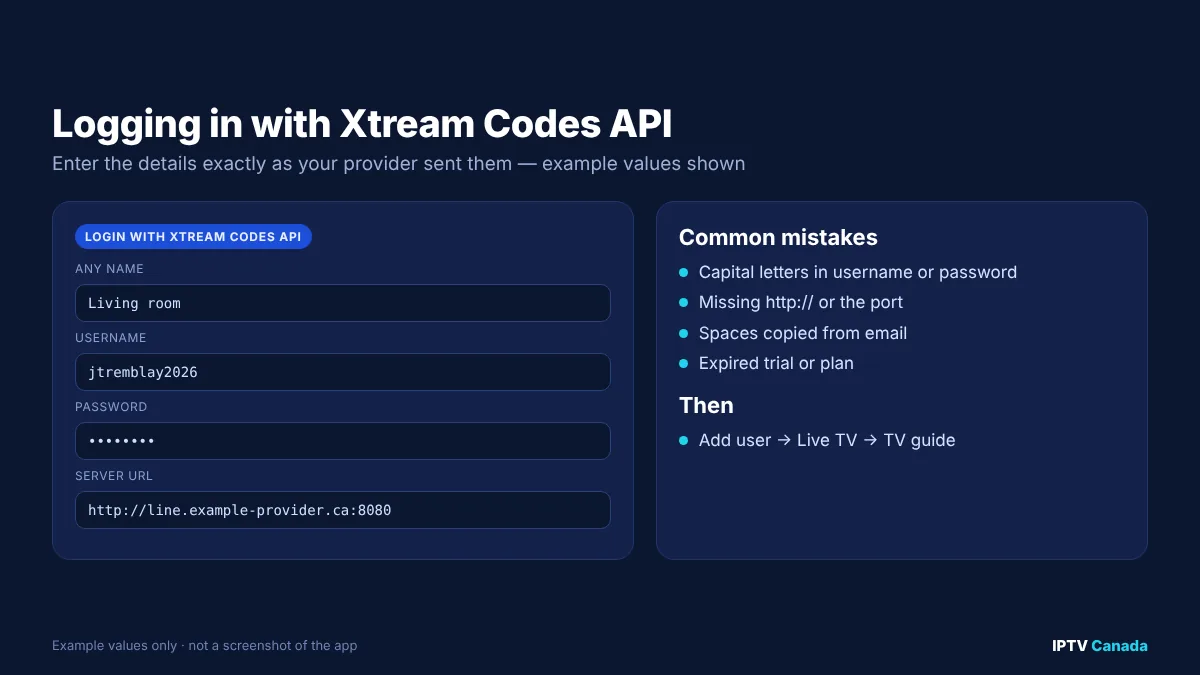
Your provider’s welcome email contains the details you need. There are two common options.
Option 1: Login with Xtream Codes API (recommended)
- On the app’s home screen, choose Add user (or +).
- Select Login with Xtream Codes API.
- Enter any name (for example “Living room”).
- Enter your username and password exactly as supplied. They are case-sensitive.
- Enter the server URL, including
http://and the port number if one was provided, for examplehttp://line.example-provider.ca:8080. - Select Add user. The app downloads your live channels, movies and series.
Xtream Codes is usually the best choice because the app loads the TV guide automatically and organises movies and series properly.
Option 2: Load your playlist or file/URL (M3U)
- Choose Add user, then Load your playlist or file/URL.
- Enter a name, select M3U URL, and paste the full link from your provider.
- Add the provider’s EPG (XMLTV) link in settings if the guide is empty.
M3U links contain your username and password inside the address, so keep them private.
Best IPTV Smarters Pro settings for Canadian viewers
A few minutes in the settings menu makes a noticeable difference:
- Time format and time zone: set your device to the correct Canadian time zone, then check the app’s EPG time shift is set to zero. A wrong setting is the most common cause of a guide that is an hour or more out.
- Player selection: the app offers more than one built-in player. If a channel stutters, switch player in Settings > Player selection and test again.
- Stream format: if your provider supports it, try switching between TS and HLS (m3u8) output.
- Buffer size: a larger buffer reduces stutter on weaker connections but increases the delay behind live TV.
- Parental control: set a PIN for adult or late-night categories.
- Hide categories: hide international categories you never watch so the channel list is shorter and faster.
How to use the TV guide, catch-up and multi-screen
- TV guide (EPG): open Live TV and select the TV guide view to browse what is on now and next. If listings are missing, refresh the EPG from settings and wait a few minutes.
- Catch-up: channels with catch-up show a small icon in the guide. Select a past programme to watch it, if your provider supports catch-up on that channel.
- Multi-screen: some versions let you watch several channels at once on one screen. Each stream counts as a connection on your plan, so check your connection limit first.
- Favourites: long-press a channel to add it to favourites, then use the favourites category as your everyday channel list.
Fixing common IPTV Smarters Pro errors in Canada
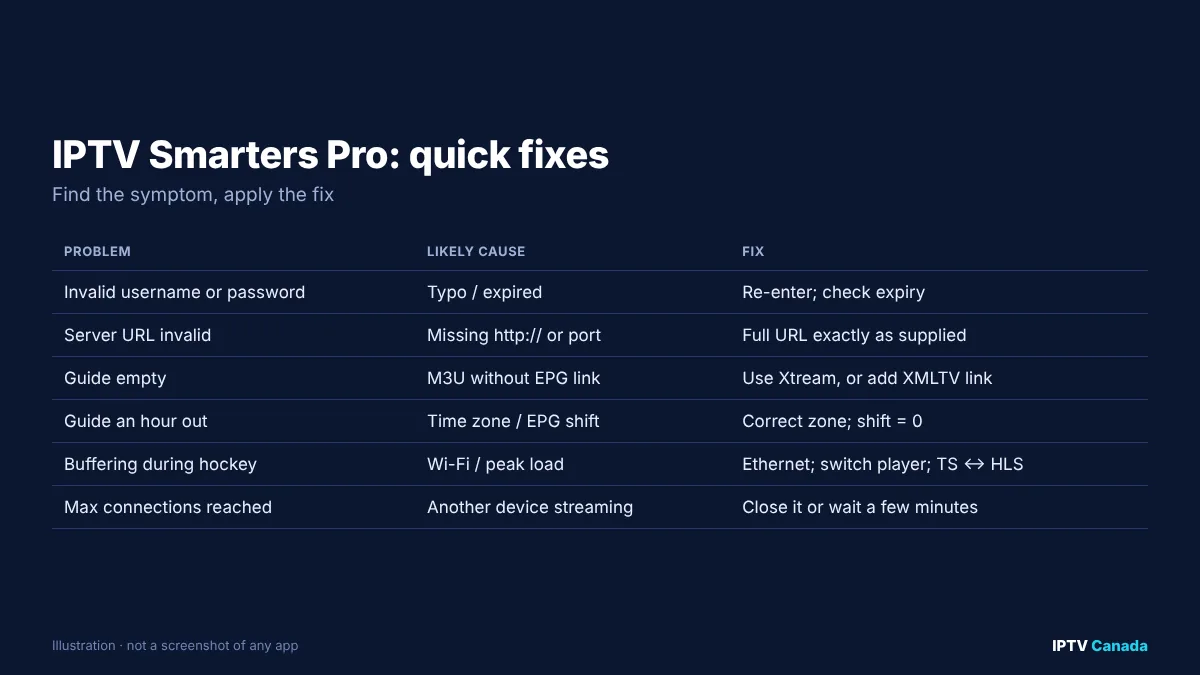
| Problem | Most likely cause | Fix |
|---|---|---|
| “Invalid username or password” | Typo, capital letters, or expired account | Re-enter carefully; check expiry date |
| “Server URL invalid” | Missing http:// or port | Enter the full server URL exactly as supplied |
| Channels load, guide is empty | M3U login without EPG link, or EPG not refreshed | Use Xtream login, or add the XMLTV link; refresh EPG |
| Guide is an hour out | Time zone or EPG time shift | Set the correct province time zone; time shift 0 |
| Buffering during hockey games | Wi-Fi, peak congestion, or player choice | Use Ethernet, switch player, try TS/HLS |
| “Maximum connections reached” | Another device is still streaming | Close the app elsewhere or wait a few minutes |
| App will not install | Unknown apps not allowed | Enable installation for Downloader |
If the problem only happens at busy times, our IPTV buffering guide for Canada explains how to separate home Wi-Fi issues from provider issues.
IPTV Smarters Pro vs TiviMate vs IBO Player
| App | Best on | Strengths | Trade-offs |
|---|---|---|---|
| IPTV Smarters Pro | Fire TV, Android, Samsung, phones | Free, simple, wide device support | Interface less polished than TiviMate |
| TiviMate | Fire TV, Android TV | Excellent guide, recording (premium) | Android only; premium features paid |
| IBO Player | Samsung, LG, Android | Strong on smart TVs | Activation fee after trial |
If you are choosing hardware as well as an app, our best IPTV box in Canada guide compares Formuler, BuzzTV, MAG and Android TV boxes.
Many Canadians start with IPTV Smarters Pro because it is free, then move to TiviMate on a Fire TV Stick or Android TV box once they know they like the service. See our TiviMate guide, IBO Player guide and best IPTV player apps in Canada.
Safety and legality
Smarters is a legal media player. It does not provide content. Whether a particular subscription is legal depends on whether the provider has the rights to the channels it distributes. Canada’s Copyright Act protects broadcasts, and Canadian courts have ordered internet providers to block unauthorised streaming services, including in the GoldTV case upheld by the Federal Court of Appeal in 2021, as Norton Rose Fulbright explains.
Two practical safety tips:
- Ignore “free Smarters codes”. Shared logins are usually taken from other people’s accounts, stop working quickly and connect you to unknown servers.
- Avoid modified APKs. Install the genuine app from an official store or the developer’s site.
Test IPTV Smarters Pro with a real subscription
The quickest way to see whether the app suits you is to try it on your own TV and internet. IPTV Canada’s 24-hour trial includes Xtream Codes and M3U details that work in IPTV Smarters Pro, and our IPTV setup guide for Canada covers every device. When you are ready, you can compare plans in CAD.
Frequently asked questions
Is IPTV Smarters Pro free in Canada?
Yes, the app is free to download on most platforms. It does not include channels; you need a subscription from an IPTV provider and log in with the details they send you.
Does IPTV Smarters Pro come with channels?
No. It is a player. The developer’s own store listing says users must have their own content.
How do I log in to IPTV Smarters Pro?
Choose Add user, then Login with Xtream Codes API, and enter any name, your username, password and server URL exactly as your provider supplied them. Alternatively, choose Load your playlist or file/URL and paste an M3U link.
Why is my IPTV Smarters Pro guide empty?
If you used an M3U link, add your provider’s XMLTV EPG link. With an Xtream login, refresh the EPG in settings. If times are wrong, set the correct Canadian time zone and an EPG time shift of zero.
Is IPTV Smarters Pro legal in Canada?
The app is a legal media player. Legality depends on the subscription you use with it and whether that provider has the rights to its channels.
Which is better, IPTV Smarters Pro or TiviMate?
Smarters is free and runs on more devices. TiviMate has a more polished TV guide and recording on Android-based devices, with premium features paid.
Why does IPTV Smarters Pro buffer during hockey games?
Busy evenings stress both home Wi-Fi and provider servers. Use Ethernet if possible, switch the app’s player, try TS or HLS streams, and test your speed at the time the problem happens.
Sources and further reading
- IPTV Smarters Pro on the Samsung TV app store, Samsung.
- Copyright Act (R.S.C., 1985, c. C-42), Justice Laws Website.
- Federal Court of Appeal upholds site-blocking order (GoldTV), Norton Rose Fulbright.
Get the next IPTV guide by email
New setup guides, app comparisons and buffering fixes for Canadian viewers – about two emails a month, no spam, unsubscribe in one click.