
Quick answer: The best IPTV box in Canada depends on how you watch. For a cable-box experience with recording and portal support, a Formuler Z11 Pro or Z11 Pro Max is the strongest all-rounder. For a dedicated box at a lower price, BuzzTV models such as the B5, E5 SE or X5 are popular. MAG boxes suit people who only use a portal login. If you also want Netflix, Crave and Tou.tv in one place, a mainstream Android TV or Google TV box, or an Nvidia Shield, running an IPTV app is often the better buy. Avoid “fully loaded” boxes sold with free channels pre-installed.
An IPTV box is simply a small media player that connects to your TV by HDMI and to your home internet, then plays live channels and on-demand content from an IPTV subscription. The box itself does not include any channels. What it does decide is how smooth the picture is, how fast the guide scrolls, whether you can record, and how easy everyday use is for everyone in the house.
This guide compares the main types of IPTV box sold in Canada in 2026, explains what each one is good at, shows typical Canadian prices, and covers what to check before you buy.
Table of Contents
What is an IPTV box?
An IPTV box (sometimes called an IPTV set-top box, IPTV receiver or Android TV box) is a device that turns an internet TV subscription into a traditional TV experience. You plug it into your TV, connect it to Wi-Fi or Ethernet, open an IPTV app, and log in with the details your provider sends you: an Xtream Codes login (server URL, username and password), an M3U playlist link, or a portal URL linked to the box’s MAC address.
There are three broad kinds:
- Dedicated IPTV boxes, such as Formuler, BuzzTV and MAG, which ship with their own IPTV software and a remote designed for live TV.
- General Android TV and Google TV boxes, which run the Google Play Store and can install IPTV apps alongside Netflix, YouTube, Crave and Tou.tv.
- Streaming sticks, such as the Amazon Fire TV Stick, which are cheaper and smaller but usually rely on Wi-Fi.
The best IPTV boxes in Canada compared
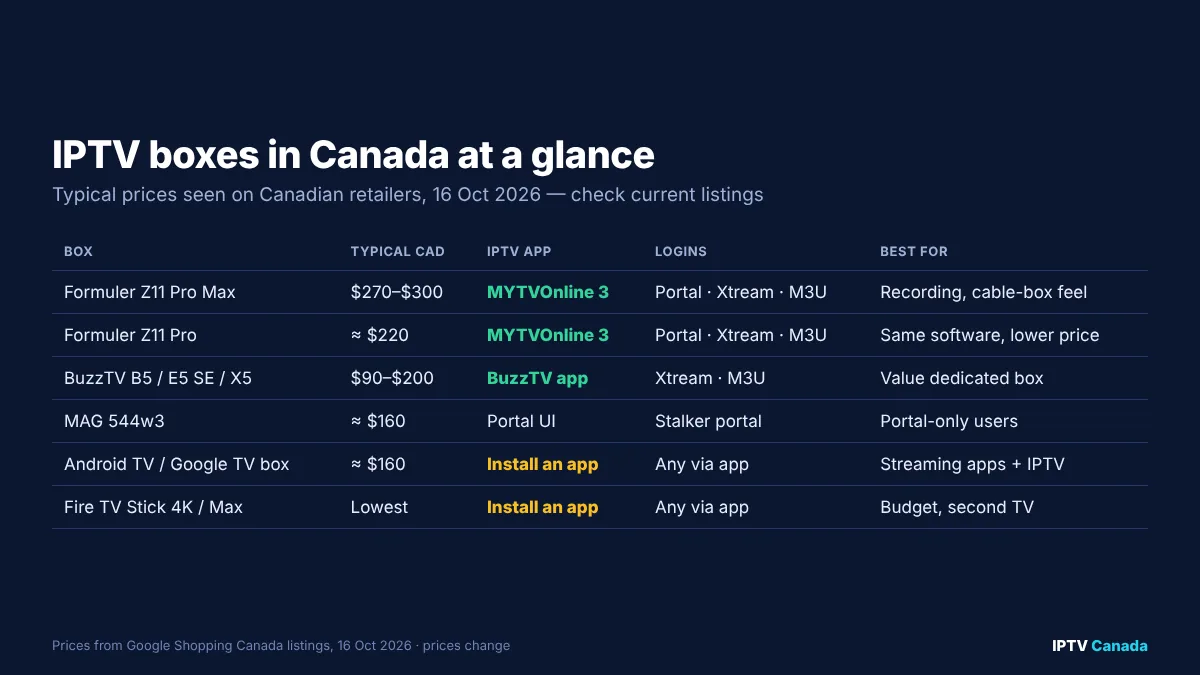
The table below summarises the most common options Canadians buy. Prices are typical ranges seen on Canadian retailers and marketplaces via Google Shopping on 16 October 2026; they change frequently, so check before you buy.
| Box | Typical price (CAD) | Built-in IPTV app | Login types | Ethernet | Best for |
|---|---|---|---|---|---|
| Formuler Z11 Pro Max | about $270–$300 | MYTVOnline 3 | Portal, Xtream Codes, M3U | Gigabit | Recording, multi-view, cable-box feel |
| Formuler Z11 Pro | about $220 | MYTVOnline 3 | Portal, Xtream Codes, M3U | Yes | Same software, lower price |
| Formuler Z10 | about $135–$150 | MYTVOnline 2 | Portal, Xtream Codes, M3U | Yes | Older budget Formuler |
| BuzzTV B5 | about $90–$100 | BuzzTV app | Xtream Codes, M3U | Yes | Entry-level dedicated box |
| BuzzTV E5 SE / X5 | about $170–$200 | BuzzTV app | Xtream Codes, M3U | Yes | Faster dedicated box |
| MAG 544w3 | about $160 | Portal interface | Stalker portal | Yes | Portal-only users |
| Android TV / Google TV box (e.g. Xiaomi TV Box S) | about $160 | None; install an app | Any, via the app | Varies | Streaming apps plus IPTV |
| Nvidia Shield TV Pro | check current price | None; install an app | Any, via the app | Gigabit | Power users, AI upscaling |
| Fire TV Stick 4K / 4K Max | check current price | None; install an app | Any, via the app | Adapter needed | Budget, second TV |
The specifications behind these boxes come from the manufacturers. For example, Formuler lists the Z11 Pro Max with Android 11, 4 GB of RAM, 32 GB of storage, Wi-Fi 6 and Gigabit Ethernet, and says MYTVOnline 3 is exclusive to the Z11 Pro and Z11 Pro Max.
Formuler: best all-round IPTV box
Formuler boxes are built around MYTVOnline, an IPTV app that feels like a cable or satellite receiver. On the Z11 Pro and Z11 Pro Max, MYTVOnline 3 adds multi-view (two channels on screen), picture-in-picture, recording and scheduled recording, timeshift (pause and rewind live TV) and a sports hub with schedules and reminders, according to Formuler’s feature page.
Why Canadians choose Formuler:
- It is one of the few mainstream boxes that handles portal logins well, while also accepting Xtream Codes and M3U on current software.
- The guide is fast, and favourites and channel groups are easy to organise.
- It runs Android, so you can usually add other apps such as TiviMate if you want a second interface.
Downsides: Formuler boxes cost more than streaming sticks, and the selection of mainstream streaming apps can be narrower than on a certified Google TV device. Check that the apps you rely on outside IPTV are supported on the model you buy.
If you already own one, our IPTV setup guide for Canada explains how to add a connection.
BuzzTV: best value dedicated box
BuzzTV makes a wide range of Android-based boxes, all built around its own BuzzTV app, which comes pre-installed on current models. Entry-level models such as the B5 are among the cheapest dedicated IPTV boxes in Canadian stores, while the E5 SE and X5 series add more memory and faster processors.
Why it appeals: you get a dedicated IPTV interface, a TV-style remote and an Ethernet port for less than a Formuler. Most BuzzTV owners log in with Xtream Codes or an M3U link.
Downsides: the range changes quickly, model names are easy to confuse, and lower-end models with 2 GB of RAM can feel slow with very large channel lists. If you can stretch your budget, choose a model with at least 4 GB of RAM.
MAG: best for portal-only users
Infomir’s MAG boxes were among the first set-top boxes built for IPTV, and they remain popular with users whose provider supplies a Stalker portal. You send your provider the box’s MAC address, enter the portal URL, and the provider’s interface loads.
MAG boxes are simple and reliable, but on many models the software is not Android, so you cannot install other apps. If your provider only offers Xtream Codes or M3U, a MAG box loses most of its advantage.
Android TV and Google TV boxes: best for everything in one place
A mainstream Android TV or Google TV box, such as the Xiaomi TV Box S, gives you access to the Google Play Store. That means you can install Canadian streaming apps such as Crave, CBC Gem, Tou.tv and Netflix next to an IPTV player such as TiviMate, IPTV Smarters Pro or IBO Player.
Why choose one: if your household watches as much on streaming apps as on live TV, one device that does both is simpler than two remotes. Our IPTV Smarters Pro guide, best IPTV player apps guide and TiviMate guide explain which app suits which viewer.
Downsides: some budget boxes lack Ethernet or certification for major streaming apps, and cheap no-name boxes are a common source of slow menus and security problems.
Nvidia Shield: best for power users
The Nvidia Shield TV Pro has long been the enthusiast’s choice. It is fast, has Gigabit Ethernet, supports AI upscaling of lower-resolution video, and runs every major IPTV app. It costs more than most boxes in this guide, and it is several years old, but many owners consider it the smoothest way to run TiviMate.
Fire TV Stick: best budget option
For many Canadians, the cheapest route is a Fire TV Stick 4K or 4K Max with an IPTV app installed. It is small, inexpensive and well supported. The main limitations are the lack of a built-in Ethernet port (you need an adapter for a wired connection) and limited storage for recording. Our Firestick IPTV guide for Canada covers setup step by step.
How to choose the right IPTV box
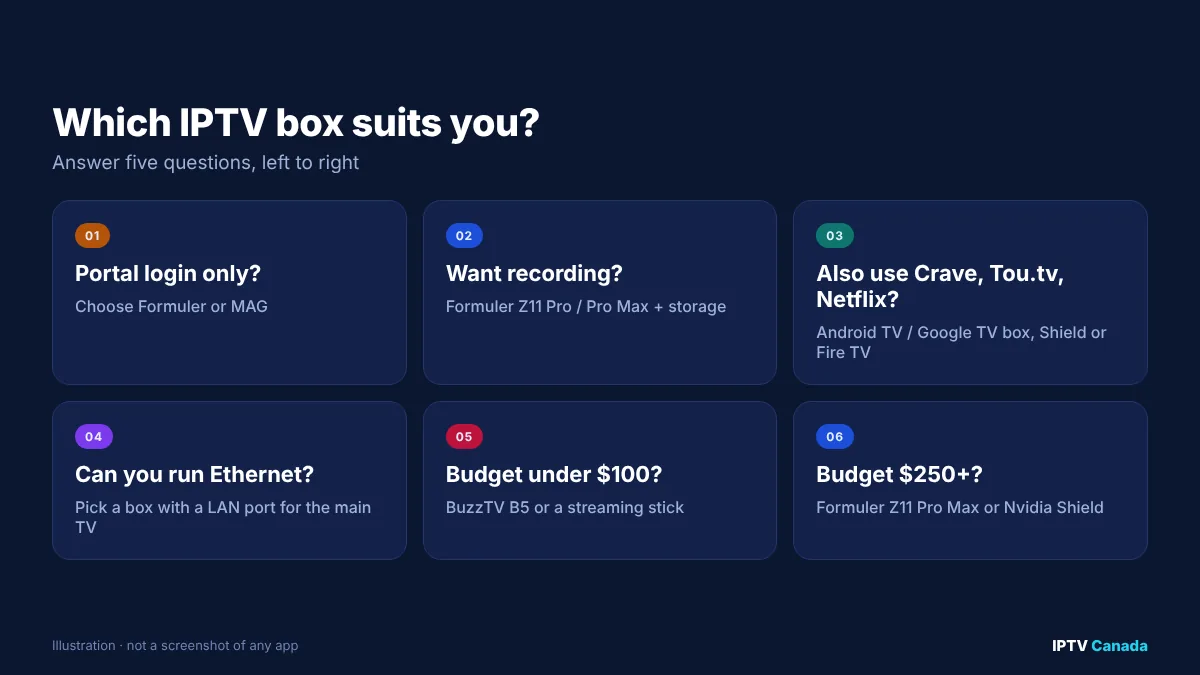
Answer these five questions and the right box usually becomes obvious:
- Which login type does your provider use? If it is a portal only, choose Formuler or MAG. If it is Xtream Codes or M3U, any box works.
- Do you want to record or pause live TV? Formuler with MYTVOnline 3 is the most complete option, provided your provider allows it and you add storage.
- Do you also watch streaming apps? Choose an Android TV or Google TV box, Nvidia Shield or Fire TV device.
- Can you use Ethernet? For the main TV, a box with an Ethernet port is the single best defence against buffering.
- What is your budget? Under about $100, a BuzzTV B5 or a streaming stick. Around $150–$220, a mid-range BuzzTV, Formuler Z11 Pro or Android TV box. Above that, a Formuler Z11 Pro Max or Nvidia Shield.
Minimum specifications worth paying for
| Specification | Minimum | Recommended |
|---|---|---|
| RAM | 2 GB | 4 GB or more |
| Storage | 8 GB | 32 GB, or USB storage for recording |
| Wi-Fi | Wi-Fi 5 (802.11ac) | Wi-Fi 6 |
| Ethernet | 100 Mbps | Gigabit |
| Video output | 1080p | 4K with HDR10 or better |
| Software | Android 9 or later | Android 11 or later, with updates |
If 4K matters to you, our 4K IPTV guide explains the internet speed and settings real 4K needs.
Avoid “fully loaded” IPTV boxes
Online marketplaces in Canada still list boxes advertised as “fully loaded”, “no monthly fees” or “all channels free”. These are boxes sold with apps pre-configured to stream paid channels without permission from the rights holders.
Canadian courts have taken action against sellers of such boxes. In 2016, the Federal Court granted an interlocutory injunction against retailers of set-top boxes pre-loaded with copyright-infringing applications, as summarised by Smart & Biggar. In 2021, the Federal Court of Appeal upheld Canada’s first site-blocking order in the GoldTV case, requiring internet providers to block access to an unauthorised streaming service, as explained by Norton Rose Fulbright.
Practically, “fully loaded” boxes also tend to stop working without warning, receive no security updates and offer no support. Buy a genuine branded box from a reputable retailer, and choose your subscription separately. The box itself is a legal product; what matters is the service you connect to it.
Setting up your IPTV box in five steps
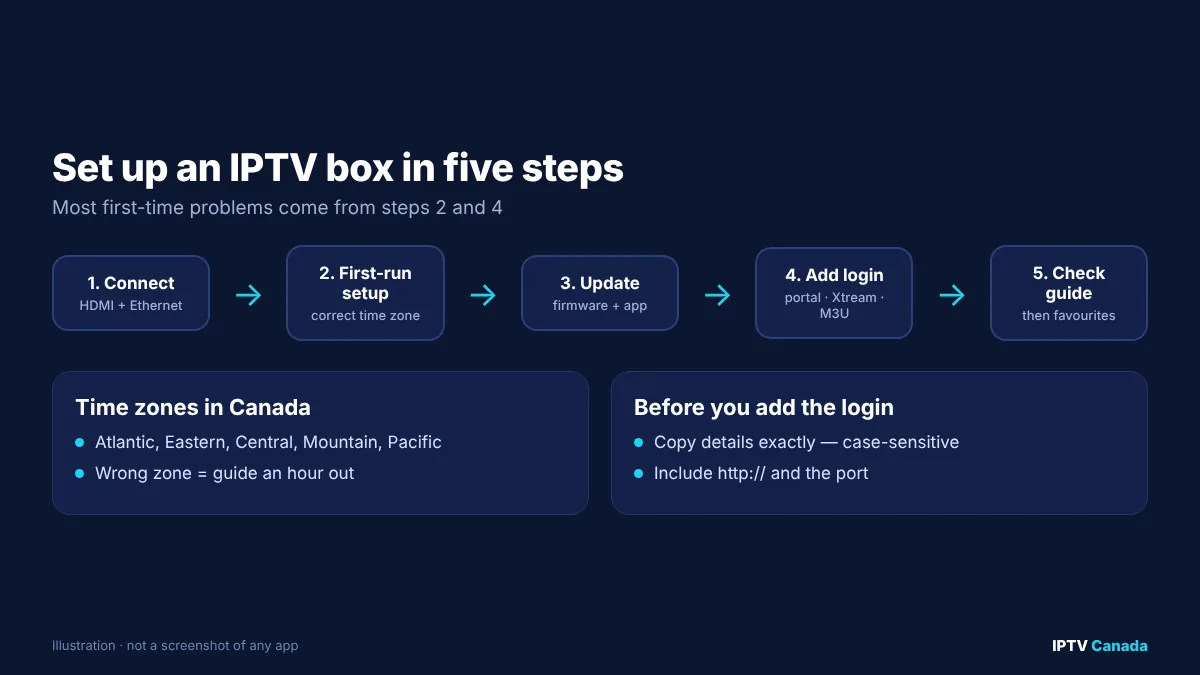
- Connect the box to your TV by HDMI and, ideally, to your router by Ethernet.
- Complete the first-run setup, choosing your language and the correct time zone (Eastern, Central, Mountain, Pacific or Atlantic). A wrong time zone is the most common reason the TV guide is an hour out.
- Install updates before adding your IPTV service.
- Add your login in the box’s IPTV app: portal URL, Xtream Codes or M3U link.
- Check the guide shows programme listings, then set up favourites and parental controls.
If the picture stutters at busy times, our IPTV buffering fixes for Canada walk through router, DNS and app settings.
Internet requirements for an IPTV box
An IPTV box can only be as smooth as the connection behind it. Netflix recommends a steady 15 Mbps for 4K and 5 Mbps for Full HD per stream, and live IPTV benefits from similar headroom. The CRTC’s universal service objective, set in Telecom Regulatory Policy 2016-496, targets at least 50 Mbps download and 10 Mbps upload for Canadian homes, which is comfortably enough for several HD streams or one or two 4K streams.
What matters most is consistency. Test your speed on the box itself during the evening, when your neighbourhood is busiest, rather than on your phone in the morning.
Try your box before committing to a long plan
The best way to judge a box and a service together is to test them on your own internet, at the times you actually watch, ideally during a hockey game. IPTV Canada offers a 24-hour trial that works in MYTVOnline, the BuzzTV app, TiviMate, IPTV Smarters Pro and other compatible players, and you can compare subscription plans in CAD afterwards. Whichever provider you choose, our guide to choosing the best IPTV in Canada lists the checks worth making first.
Frequently asked questions
What is the best IPTV box in Canada?
For most viewers who want a cable-box experience, the Formuler Z11 Pro or Z11 Pro Max with MYTVOnline 3 is the best all-rounder. BuzzTV is a strong lower-cost alternative, MAG suits portal-only users, and an Android TV box or Nvidia Shield is better if you also watch streaming apps.
Do IPTV boxes come with channels?
No. A genuine IPTV box is a media player. You add a subscription from a provider, which gives you an Xtream Codes login, an M3U link or a portal URL.
Are IPTV boxes legal in Canada?
Yes. The boxes themselves are legal products. Boxes sold “fully loaded” with apps that stream paid channels without permission are a different matter, and Canadian courts have granted injunctions against sellers of such boxes.
Is a Formuler box better than a Firestick?
A Formuler box is better if you want Ethernet, recording, multi-view or a portal login. A Fire TV Stick is cheaper and runs all the main IPTV apps, so it is often enough for a second TV or a tight budget.
How much does an IPTV box cost in Canada?
Typical prices seen on Canadian retailers in October 2026 ranged from about $90 for an entry-level BuzzTV box to about $300 for a Formuler Z11 Pro Max. Prices change often, so check current listings.
How much RAM does an IPTV box need?
At least 2 GB, but 4 GB or more makes large channel lists and the TV guide far smoother.
Can I use an IPTV box on two TVs?
Each TV needs its own device, and your subscription must allow enough simultaneous connections. Portal logins are tied to one box’s MAC address, so a second box needs its own activation.
Sources and further reading
- Formuler Z11 Pro Max specifications, Formuler.
- MYTVOnline 3 features, Formuler.
- Federal Court injunction against retailers of pre-loaded set-top boxes, Smart & Biggar.
- Federal Court of Appeal upholds site-blocking order (GoldTV), Norton Rose Fulbright.
- Telecom Regulatory Policy CRTC 2016-496, CRTC.
- Internet connection speed recommendations, Netflix Help Centre.
Get the next IPTV guide by email
New setup guides, app comparisons and buffering fixes for Canadian viewers – about two emails a month, no spam, unsubscribe in one click.