
Canadian IPTV is television delivered over your home internet connection instead of through a cable box or satellite dish, set up for the way people in Canada actually watch: Canadian and US channels side by side, English and French, hockey and football on the same guide, and a picture that holds up on a Toronto condo connection or a fibre line in Calgary.
This guide explains what Canadian IPTV means, how it works, what a subscription usually includes, which devices and apps people use, the internet you need, why streams buffer and how to fix it, where the law stands, and how to judge a service before you pay for one.

- What it is: live channels, catch-up and on-demand video streamed over your internet connection to an app on your TV, stick, box, phone or computer
- What makes it Canadian: Canadian channels and regional feeds, English and French content, guides set to your time zone, pricing in CAD and support in Canadian hours
- Two separate parts: the subscription (access to the content) and the player app (what displays it); you can change one without the other
- Internet: roughly 5–8 Mbps per HD stream and 25 Mbps or more for 4K; stability matters more than headline speed
- Devices: Samsung and LG smart TVs, Amazon Fire TV, Android TV and Google TV, Apple TV, phones, tablets, Windows and Mac
- Legal position: the technology is legal and used by Canada’s own telecoms; whether a specific service is lawful depends on the rights it holds to the content
Free download: IPTV Canada checklist 2026 (PDF), the 7 checks to make before you pay for any IPTV service in Canada.
What is Canadian IPTV?
Canadian IPTV is a television service that delivers live channels and on-demand video to viewers in Canada over the internet, using Internet Protocol (IP) instead of a cable, satellite or over-the-air signal. A subscription gives you a login; a player app on your TV or device uses that login to load a channel guide, live streams, catch-up and a video library, much like a cable box but without the box.
The “Canadian” part is not decoration. Plenty of IPTV services exist worldwide, and most of them were assembled for somebody else. A service built for Canada organizes its guide around Canadian and US channels, carries French-language channels alongside English ones, sets the electronic programme guide (EPG) to Eastern, Central, Mountain, Pacific or Atlantic time rather than leaving it on a European clock, quotes prices in Canadian dollars, and staffs support during the hours Canadians watch, which for most of the country means evenings and weekends when the puck drops.
Two other distinctions help. Canadian IPTV is not the same as the streaming apps you already know: Netflix, Crave or CBC Gem each carry one company’s catalogue, while an IPTV service brings a wide multi-channel line-up into a single guide. And it is not a separate technology from what the big telecoms sell: Bell, Telus and others deliver their own fibre TV products over IP too.
The difference with an independent Canadian IPTV service is that it runs over whatever internet connection you already have, on devices you already own. If you want the pure technology explained first, the guide to what IPTV is and how IPTV streaming works in Canada covers that ground.
How does IPTV work in Canada?
IPTV in Canada works through five separate pieces: your internet connection, an IPTV subscription, a player app, a device to run the app, and the live TV or on-demand stream that arrives on your screen. The subscription and the player app are different things, bought and installed separately, and understanding that one distinction prevents most of the confusion people run into when they start.
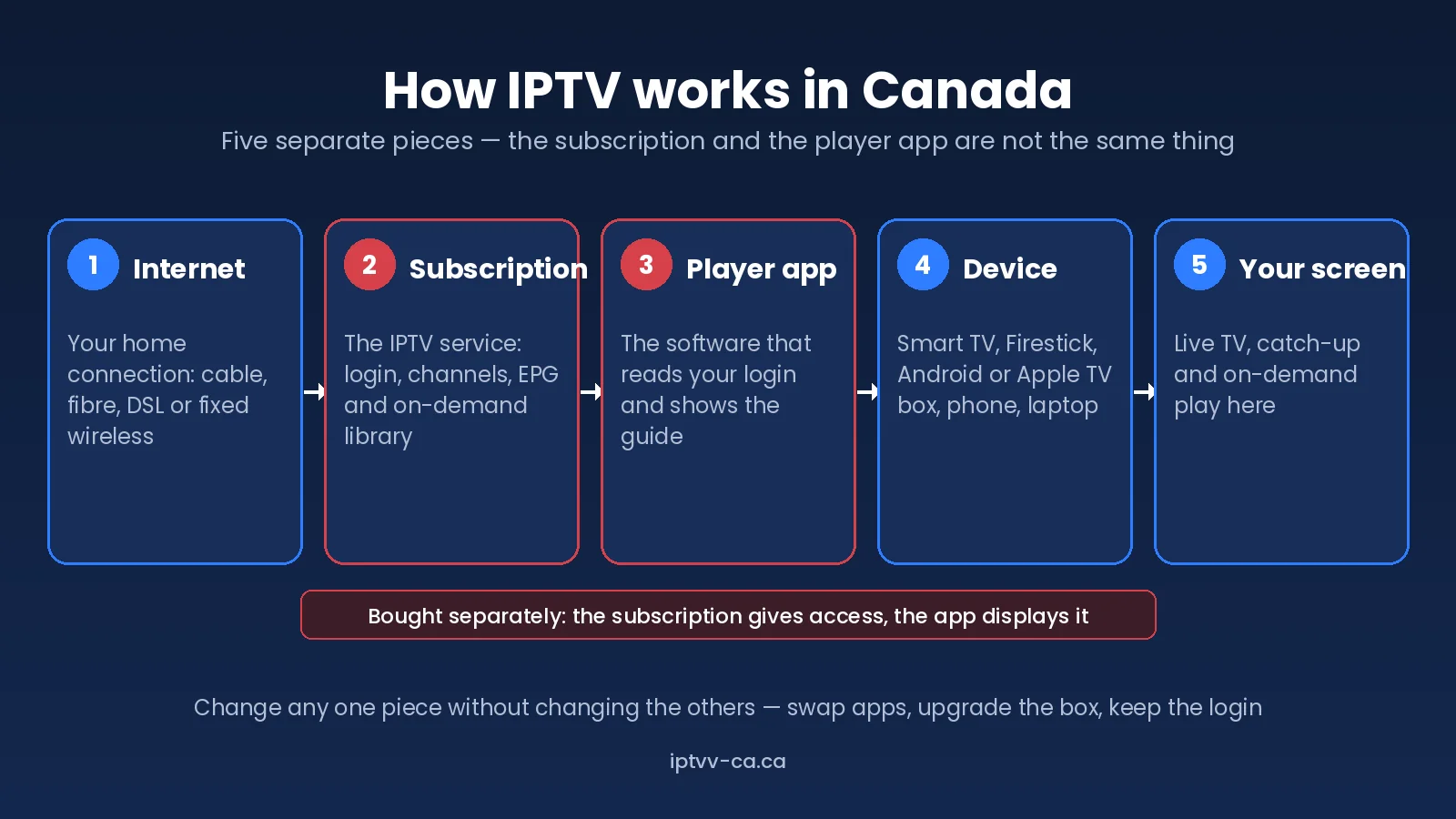
- Internet connection. Cable, fibre, DSL or fixed wireless from any Canadian provider. IPTV does not care which company supplies it, only that the connection is stable enough to carry a video stream.
- IPTV subscription or service. This is what you pay for. It gives you access to the provider’s channels, guide and library, usually in the form of an M3U playlist link or an Xtream Codes login (server address, username and password).
- IPTV app or player. A piece of software that reads your login and turns it into a channel list, a guide and a video window. The app does not contain any channels itself.
- Streaming device. Whatever runs the app: a smart TV, an Amazon Fire TV Stick, an Android or Apple TV box, a phone, a tablet or a computer.
- Live TV and VOD delivery. When you pick a channel, the app requests that stream from the provider’s servers, buffers a few seconds ahead and plays it. On-demand titles work the same way, just from a stored file rather than a live feed.
Because the pieces are independent, you can change any one of them: replace an ageing Firestick with an Android TV box and keep the same login, or move to a different player app because you prefer its guide. That modularity is one of the main practical differences between Canadian IPTV and a cable package, where the box, the service and the guide arrive as one locked bundle.
What does a Canadian IPTV subscription include?
A Canadian IPTV subscription usually includes live television, a channel guide, an on-demand library of films and series, and, depending on the provider, catch-up on selected channels and a set number of simultaneous connections. The depth of each component varies a great deal between services, so it is worth knowing what each one means before comparing two offers.
| Component | What it usually means | Worth checking |
|---|---|---|
| Live television | Canadian, US and international channels streamed in real time | Are the specific Canadian channels you watch present and in HD? |
| EPG (programme guide) | The grid showing what is on now and next | Is it set to your time zone and populated for Canadian channels? |
| Video on demand (VOD) | Films and series you can start at any time | Is the library organized and searchable, with French titles if you need them? |
| Catch-up | Replay of recent broadcasts on supported channels | Which channels support it, and for how many days? Not every provider offers it. |
| Sports | Hockey, football, basketball, baseball, soccer, cricket and PPV events | Does the provider add extra feeds on busy nights, or do streams degrade? |
| Connections | How many devices can stream at once on one login | Does the plan match the number of TVs in your household? |
| Support | Help when a channel drops or a login fails | Is it reachable in Canadian evening hours, and how quickly does it reply? |
Channel counts are the number every provider leads with and the least useful one to compare. A line-up of tens of thousands of channels means nothing if CBC, CTV, Global, TVA, Sportsnet and TSN are missing, unstable or only available in standard definition. Judge a Canadian IPTV subscription by the fifty channels your household actually watches.
What channels do Canadian IPTV viewers look for?
Viewers in Canada tend to look for the same handful of categories, roughly in this order: Canadian broadcast and specialty channels, sports, US networks, French-language channels, news, movies and series, and international channels from home. What is available varies by provider, so treat the list below as a shopping list to check against rather than a promise of what any service carries.
- Canadian television: the national networks, their regional feeds, and specialty channels for news, lifestyle, documentaries and kids.
- English-language channels from the US: the major networks and cable channels that many Canadians grew up watching through cable.
- French-language channels: essential for households in Quebec, Ottawa–Gatineau, Acadian New Brunswick and Franco-Ontarian communities, and often a quiet weakness of services built outside Canada.
- Sports: hockey above all, then football, basketball, baseball and soccer, plus cricket for many families in Surrey and Brampton, and pay-per-view events.
- News: Canadian, US and international 24-hour channels.
- Movies and series: both live movie channels and the on-demand library.
- International channels: Punjabi, Hindi, Tagalog, Arabic, Portuguese, Italian, Mandarin and Cantonese line-ups are among the most requested in Canada’s larger cities.
For a worked example of how a Canadian line-up should be organized, the Canadian IPTV channel list shows Canadian, US, French and international packs grouped the way a viewer here would expect. The IPTV Montreal and IPTV Québec guides go into the French-language side in more depth.
Which devices work with IPTV in Canada?
IPTV works on almost any device that can run an app: Samsung and LG smart TVs, Android TV and Google TV sets and boxes, Amazon Fire TV and Firestick, Apple TV, Android and Apple phones and tablets, Windows and Mac computers, and dedicated set-top boxes such as MAG and Formuler units. The best device is usually the one already connected to your main TV, provided it is recent enough to play HD video smoothly.
| Device | How it runs IPTV | Notes for Canadian viewers |
|---|---|---|
| Samsung Smart TV (Tizen) | Player app from the Samsung store | No extra hardware; older models may lack the app you want |
| LG Smart TV (webOS) | Player app from the LG Content Store | Same as Samsung; check the TV’s Wi-Fi is on 5 GHz |
| Android TV / Google TV | Apps from Google Play, including TiviMate | The most flexible platform; Chromecast with Google TV and Shield are common picks |
| Amazon Fire TV / Firestick | Apps from the Amazon store or sideloaded | The most popular route in Canada because it is cheap and works on any HDMI TV; a 4K model handles busy nights better than the basic stick |
| Apple TV, iPhone, iPad | Apps from the App Store | Fewer app choices than Android, but the main players are well maintained |
| Android phones and tablets | Apps from Google Play | Useful for watching on the go or casting to a TV |
| Windows and Mac | Desktop players or a web-based player | Handy for a second screen or for testing a login quickly |
| MAG and Formuler boxes | Built-in portal using a portal URL | Dedicated IPTV boxes; setup differs from app-based devices |
Screen-by-screen instructions for each of these are in the IPTV setup guide for Canada, and there is a dedicated walkthrough for installing IPTV on a Firestick in Canada, which remains the most common question we receive.
Which IPTV apps can Canadian viewers use?
An IPTV app, also called a player, is the software that displays your subscription. The subscription provides access to the channels and library; the player is only the window you watch them through. Any player that accepts an M3U playlist or Xtream Codes login will work with most Canadian IPTV subscriptions, and your choice comes down to which device you own and which guide layout you prefer.
Players fall into a few broad types:
- Full-featured TV players such as TiviMate on Android TV and Fire TV, with a polished guide, favourites, multi-view and recording options. Usually the best experience on a big screen.
- Cross-platform players such as IBO Player Pro and IPTV Smarters, which exist on smart TVs, Fire TV, Android, iOS and desktop, so one app can cover every screen in the house.
- Lightweight or generic players such as VLC, which play a stream but offer little in the way of a guide or on-demand browsing.
- Portal-based boxes such as MAG and Formuler, which use their own built-in interface instead of a downloadable app.
No single app is perfect on every device. Some smart TV versions of a player lack features found in the Android version; some Apple builds trail Android by a release or two. The comparison of the best IPTV players and apps for Canadian viewers walks through each one by platform, and the TiviMate guide and IBO Player Pro guide cover setup and the settings that matter.
What internet speed is recommended for IPTV in Canada?
As a working guide, allow about 3–5 Mbps per standard-definition stream, 5–8 Mbps for HD, 8–15 Mbps for Full HD and 25 Mbps or more for 4K, for each device streaming at the same time. Most Canadian home connections clear those numbers easily. The CRTC’s universal service objective, which it describes on its Internet – Our Role page, is 50 Mbps download and 10 Mbps upload for fixed broadband, enough for several HD streams at once.
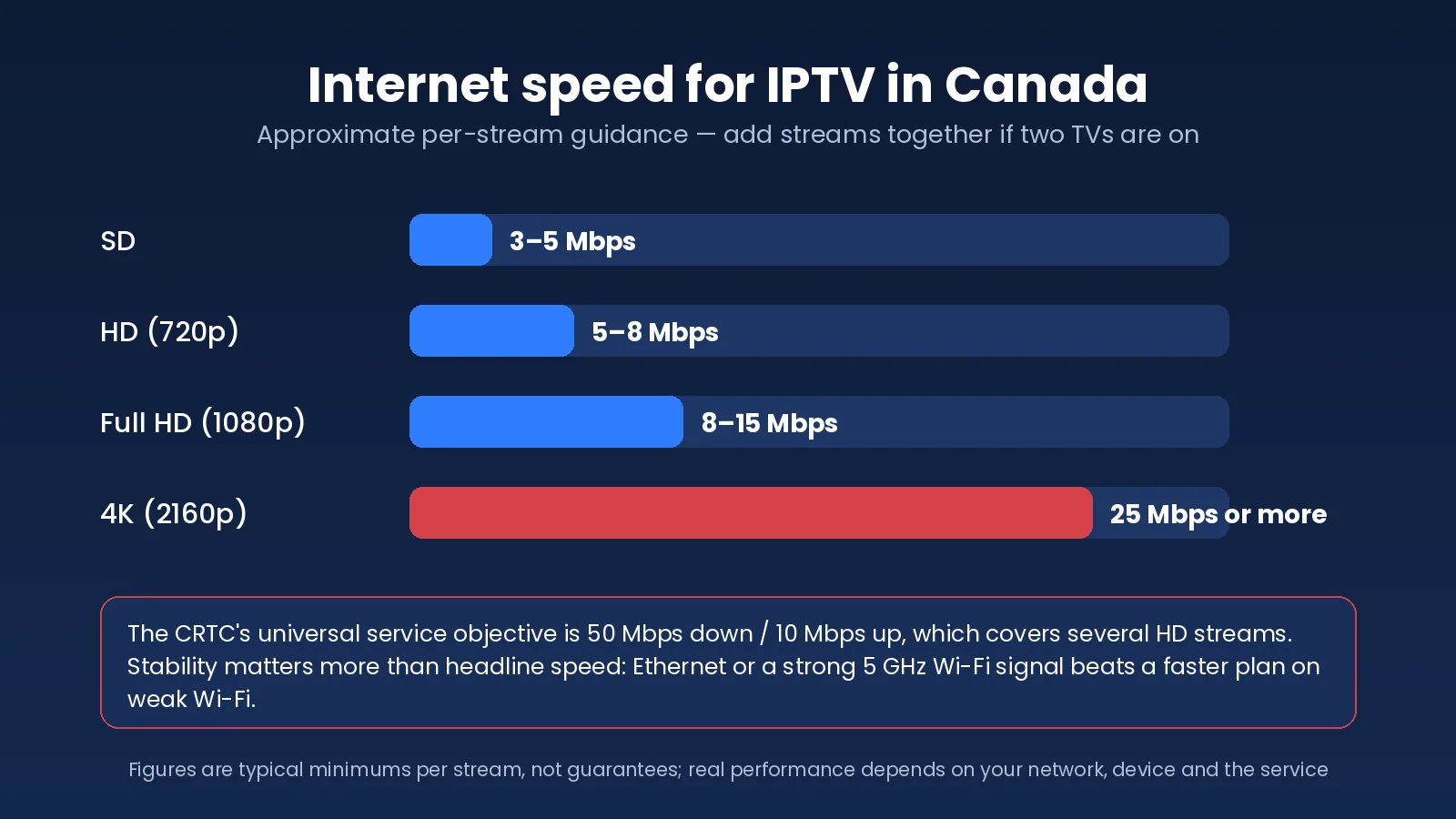
Those figures are minimums per stream, not guarantees of a smooth picture. Real performance also depends on:
- Wi-Fi quality: the signal at the TV, not the speed at the router. A 500 Mbps plan delivering 12 Mbps through two walls to a 2.4 GHz TV will buffer.
- Your router: older or ISP-supplied routers can struggle with several video streams plus everything else in the house.
- Network congestion: cable connections in dense neighbourhoods and condo buildings can slow in the evening when everyone is online.
- Device performance: a basic streaming stick or older smart TV may not decode a high-bitrate 4K stream cleanly whatever the connection.
- Server conditions: how much capacity the provider has during a Saturday-night game.
- ISP routing: the path between your provider’s network and the IPTV servers, which can vary by region and by time of day.
Rural and northern connections deserve a mention. Fixed wireless and satellite internet can carry IPTV, but higher latency and data caps change the picture: check your plan’s data allowance, since HD viewing uses roughly 2–3 GB per hour and 4K considerably more.
Canadian IPTV and streaming quality
Canadian IPTV services typically offer channels in SD, HD (720p), Full HD (1080p) and, for a growing but still limited set of channels and on-demand titles, 4K. The label on the channel is only half the story: picture quality depends on the bitrate the provider encodes at, and two “HD” streams can look very different if one has been compressed hard to save bandwidth.
- SD is fine on a phone and a fallback on a weak connection, but soft on a large TV.
- HD and Full HD are the standard for most Canadian channels and where most viewing happens.
- 4K only exists where the source is genuinely produced in 4K, which is a handful of sports events, films and documentary channels; an upscaled HD feed labelled 4K is still HD.
- Adaptive quality is offered by some providers and apps, stepping the stream down when your connection dips rather than freezing; where it exists, it is worth enabling.
- Wired Ethernet versus Wi-Fi: a cable from router to TV removes the single biggest variable. Where that is impossible, a mesh node or powerline adapter near the TV is the next best thing.
- Device limitations: entry-level sticks and older TVs cap out on bitrate and codec support; a 4K-capable device is worth the small extra cost if you care about sports.
Why does IPTV buffer in Canada?
IPTV buffers when the next few seconds of video do not arrive before the player needs them. In Canada the usual causes are, roughly in order of likelihood: weak Wi-Fi at the TV, evening congestion on a shared cable line, an overloaded home network, a VPN routing traffic the long way round, a device short on memory, an outdated app or a full cache, DNS or routing issues, a temporary problem with one channel’s source, or a server-side capacity problem at the provider.
None of these is automatically the fault of your ISP or the IPTV service; the point of troubleshooting is to find out which one it is.
Work through the steps in this order, and stop when the problem clears:
- Restart the streaming device. A full power-off, not just sleep.
- Restart the router. Wait a minute before powering it back on.
- Test on Ethernet if you can. If buffering vanishes on a cable, the problem is Wi-Fi, and a mesh node or 5 GHz connection will fix it.
- Try another player app. Apps handle buffering differently; a larger buffer setting can smooth out small dips.
- Toggle any VPN. If you use one, test with it off and then on a nearby server; some VPN routes add enough latency to break a live stream.
- Test another device. Play the same channel on a phone over the same Wi-Fi. If the phone is fine, the TV or stick is the weak link.
- Check whether it is one channel or everything. One channel freezing while others play points to a source issue the provider needs to fix; everything freezing points to your network or the provider’s servers.
- Contact support with specifics. The channel, the time, the device, whether you were on Wi-Fi or Ethernet, and what you have already tried. Vague reports get vague answers.
The full troubleshooting guide, how to fix IPTV buffering in Canada, goes deeper on each step with device-specific settings for Firestick, smart TVs, Android and Apple.
Can Canadian IPTV be used on multiple devices?
Yes, with one distinction that matters. You can usually install a player app and enter the same login on several devices, such as the living-room TV, a bedroom Firestick and a phone. How many of them can stream at the same moment depends on the number of simultaneous connections included in your subscription. A one-connection plan lets you watch on any of your devices, one at a time; two TVs on at once needs a two-connection plan.
Exceeding the limit will stop one of the streams or show an error until another device disconnects. If your household regularly has the hockey on downstairs and cartoons on upstairs, count the screens before choosing a plan.
Is IPTV legal in Canada?
IPTV as a technology is legal in Canada. It is simply a way of delivering television over the internet, and Canada’s own telecoms use it for their fibre TV products. Whether a particular IPTV service is lawful is a separate question that depends on licensing, distribution rights and copyright permissions for the content it streams, not on the delivery method.
The governing law is Canada’s Copyright Act, which protects broadcasters and rights holders and gives them remedies against unauthorized distribution. Enforcement in Canada has focused on operators and sellers of unauthorized services, including court-ordered site blocking sought by broadcasters and sports rights holders, rather than on individual viewers, but that does not make a service lawful simply because you paid for it. Reasonable signs of a provider that takes rights seriously include published terms, a copyright and DMCA policy it actually acts on, identifiable contact details and a refund policy. A service that hides all of that is telling you something.
Consumers in Canada also have general protections when buying digital services; the federal Office of Consumer Affairs is a good starting point for those, and your province’s consumer protection body handles most complaints. This is general information rather than legal advice. If you are unsure about a specific service, read its terms, look for its copyright and DMCA policy, and ask a lawyer if the answer matters to you.
How to evaluate a Canadian IPTV service
The most reliable way to evaluate a Canadian IPTV service is to test it in your own home, on your own devices, at the time of day you actually watch. Everything else is a proxy. Use these eight checks, in this order, and expect a service to pass all of them before you commit to anything longer than a month.
- Device compatibility. Does it work in a standard player on the TV or stick you already own, without a proprietary app you would be locked into?
- Channel relevance. Are the Canadian, French and sports channels your household watches present, in HD, and easy to find in the guide?
- Server reliability. Watch between 7 p.m. and 11 p.m. local time on a game night. Peak-time stability is the single best predictor of long-term satisfaction.
- Streaming quality. Compare an HD channel on a large TV against what you are used to. Look for compression artefacts in fast motion.
- EPG availability. Does the guide show the right programme, right now, on a Canadian channel, in your time zone?
- Customer support. Send a real question and time the reply. Note whether a person answered it and whether they were awake during Canadian evening hours.
- Trial and refund terms. Is there a paid or free trial on the same servers as paying customers, and a written refund policy you could actually use?
- Simultaneous connections. Does the plan include the number of streams your household needs, at a price that still makes sense?
Two companion guides turn this into a scoring exercise: how to choose the best IPTV in Canada for your household works through a weighted checklist and the red flags that disqualify a provider, and IPTV from Canada: choosing a service that actually works here covers the Canada-specific details of time zones, payment and ISPs.
Canadian IPTV vs traditional TV
Cable and satellite still do some things better than Canadian IPTV, and it helps to be clear-eyed about which. The table compares the two on the points that come up most often when Canadians consider switching.
| Feature | IPTV | Traditional cable / satellite |
|---|---|---|
| Delivery method | Streamed over your internet connection | Coaxial cable or satellite dish, separate from your internet |
| Device flexibility | Smart TV, stick, box, phone, tablet, computer; one login, many screens | Provider’s set-top box, usually one per TV, sometimes rented |
| On-demand options | Large VOD library included; catch-up on selected channels where offered | On-demand store, often pay-per-title; PVR recording built in |
| Installation | Install an app and enter a login; no technician visit | Technician visit or self-install kit; dish needs line of sight |
| Internet dependency | Entirely dependent on your internet connection and home Wi-Fi | Works during an internet outage; unaffected by Wi-Fi |
| Channel organization | Set by the provider and the app; favourites and custom lists are easy | Fixed numbering; local and community channels guaranteed |
| Portability | Works anywhere with internet, including the cottage and travel | Tied to the installed address |
| Contract | Usually monthly to yearly, no long-term contract | Often a one- or two-year term with equipment fees |
For a fuller two-year cost comparison including sports tiers, see IPTV vs cable in Canada.
How much does Canadian IPTV cost?
Canadian IPTV pricing depends on the subscription length, the number of simultaneous connections, the content package, the level of support and how the service is structured, meaning whether you are buying from a provider that runs its own servers or from a reseller. Longer terms cost less per month; extra connections add a few dollars each; and very low prices usually signal a reseller with no control over capacity.
For a concrete reference point, IPTV Canada’s current plans are C$20.99 for one month, C$41.99 for three months, C$55.99 for six months and C$90.99 for twelve months, each for one device, with a 24-hour full-access trial for C$1.99. All prices are in Canadian dollars and are listed on the IPTV subscription plans for Canada page. A broader look at what the Canadian market charges and what each price tier buys is in IPTV cost in Canada.
Can you test IPTV before buying?
You should, and a proper Canadian IPTV test is short. A 24-hour trial on the same servers as paying customers lets you confirm six things before spending real money: that the app works on your device, that the Canadian channels you care about load, that on-demand titles play, that the guide is populated and on your time zone, that streams stay stable at peak time, and that your home network can actually carry the picture you want.
Not every trial is free. Some providers charge a nominal amount to discourage abuse of the servers; IPTV Canada’s 24-hour IPTV trial for Canada costs C$1.99, gives full access on one device, and ends automatically with nothing to cancel. Whichever service you test, run it in the evening rather than at lunchtime, and on the TV you will really use.
Test Canadian IPTV on your own TV tonight: every channel, live sports and on-demand, 24 hours for C$1.99.
How to get started with IPTV in Canada
Getting started with Canadian IPTV takes about ten minutes once you have a login. The sequence is the same on every device.
- Choose your device. The smart TV, stick or box already attached to your main screen is usually fine. The supported devices and setup guide lists what works.
- Select a compatible IPTV app. Install a player from your device’s app store. See the IPTV apps for Canadian viewers comparison if you are undecided.
- Choose a suitable subscription or trial. Start with a short term. The IPTV trial in Canada is the low-risk first step; IPTV subscriptions in Canada lists the plans.
- Add the supplied login. Enter the M3U link or the Xtream Codes server, username and password exactly as provided.
- Load the playlist and guide. The first load can take a minute while the app downloads the channel list and EPG.
- Test live TV and VOD. Play a Canadian channel, a sports channel and one on-demand title. Check the guide shows the right programme.
- Adjust settings if needed. Switch to 5 GHz Wi-Fi or Ethernet, raise the app’s buffer, and set the EPG time offset if the guide is off by an hour.
If something does not work, the IPTV Canada support page is the fastest route to a fix, and the IPTV guides for Canada index collects every setup and troubleshooting article in one place.
Canadian IPTV FAQ
What is Canadian IPTV?
Canadian IPTV is live television and on-demand video delivered over your internet connection to an app on your TV or device, organized for viewers in Canada: Canadian and US channels, English and French content, a guide set to Canadian time zones and pricing in Canadian dollars.
How does IPTV work in Canada?
Five pieces work together: your internet connection, an IPTV subscription that provides the login and content, a player app that displays it, a device that runs the app, and the live or on-demand stream itself. The subscription and the app are separate, so you can change either one independently.
Can I use IPTV on a smart TV in Canada?
Yes. Samsung and LG smart TVs run IPTV player apps from their own app stores, and Android TV and Google TV sets install players from Google Play. If your TV is too old for the app you want, an Amazon Firestick plugged into an HDMI port is the usual workaround.
Does IPTV work on a Firestick?
Yes. The Amazon Fire TV Stick is the most common IPTV device in Canada. You install a player such as TiviMate, IBO Player Pro or IPTV Smarters, enter your login and start watching. A 4K model copes better with high-bitrate sports streams than the basic stick.
What internet speed do I need for IPTV in Canada?
Roughly 5–8 Mbps per HD stream, 8–15 Mbps for Full HD and 25 Mbps or more for 4K, per device streaming at once. Most Canadian home connections exceed this; stability, Wi-Fi quality and evening congestion matter more than the headline speed of your plan.
Why does IPTV buffer?
Buffering means the next seconds of video did not arrive in time. The usual causes are weak Wi-Fi at the TV, evening congestion, a VPN adding latency, an underpowered device, a full app cache, a problem with one channel’s source or a provider server under load. Restart the device and router, test on Ethernet, then narrow it down from there.
Can I watch IPTV on two TVs at the same time?
Only if your subscription includes two simultaneous connections. You can install the app and login on several devices, but the number that can stream at the same moment is set by your plan. Check the connection count before choosing.
Is IPTV legal in Canada?
The technology is legal and is used by Canada’s own telecoms. Whether a specific service is lawful depends on whether it holds the rights to the content it streams under Canada’s Copyright Act. Look for published terms, a copyright policy and real contact details, and ask a lawyer if you are unsure.
Do I need a VPN for IPTV in Canada?
Not usually. A VPN is a privacy tool, not a requirement for IPTV, and a poorly routed VPN can add enough latency to cause buffering. If you use one, test streams with it on and off, and choose a nearby server if you keep it on.
What is the difference between an IPTV player and an IPTV subscription?
The subscription is the service you pay for: it provides your login, the channels, the guide and the on-demand library. The player is the app that reads that login and displays everything on your screen. Players are generic and work with many services; the subscription is what determines what you can watch.
Can I watch French and English channels with Canadian IPTV?
Depending on the provider, yes. A service built for Canada carries French-language channels alongside English ones, which matters for households in Quebec, Ottawa–Gatineau and francophone communities elsewhere. Check the channel list for the specific French channels you watch before subscribing.
Can I test IPTV before subscribing?
Yes. Many providers offer a short trial; some are free and some charge a small amount to protect their servers. Run the trial in the evening on the TV you will actually use, and check live channels, on-demand, the guide and peak-time stability before buying a longer plan.
Final thoughts on Canadian IPTV
Canadian IPTV is a subscription and an app, not a box and a contract: live channels, catch-up and on-demand delivered over the internet connection you already pay for, to the screens you already own. The technology is the same one the country’s telecoms use. What separates a service worth keeping from one worth leaving is whether it was built for Canada, whether it holds up on a game night, whether the guide and the French channels are right, whether its legal pages exist, and whether someone answers when you need help. None of that can be judged from a channel count, so test it yourself, in the evening, on your own TV, before you commit to more than a month.
When you are ready, the 24-hour trial and the subscription plans in CAD are the two pages you need.
Read more: IPTV Canada in 2026: What It Is and What Canadian Viewers Get — our companion guide on Medium.
Get the next IPTV guide by email
New setup guides, app comparisons and buffering fixes for Canadian viewers – about two emails a month, no spam, unsubscribe in one click.